IT security plan: how to create one in 2026?

Secure your IT assets effortlessly
Discover our all-in-one solution

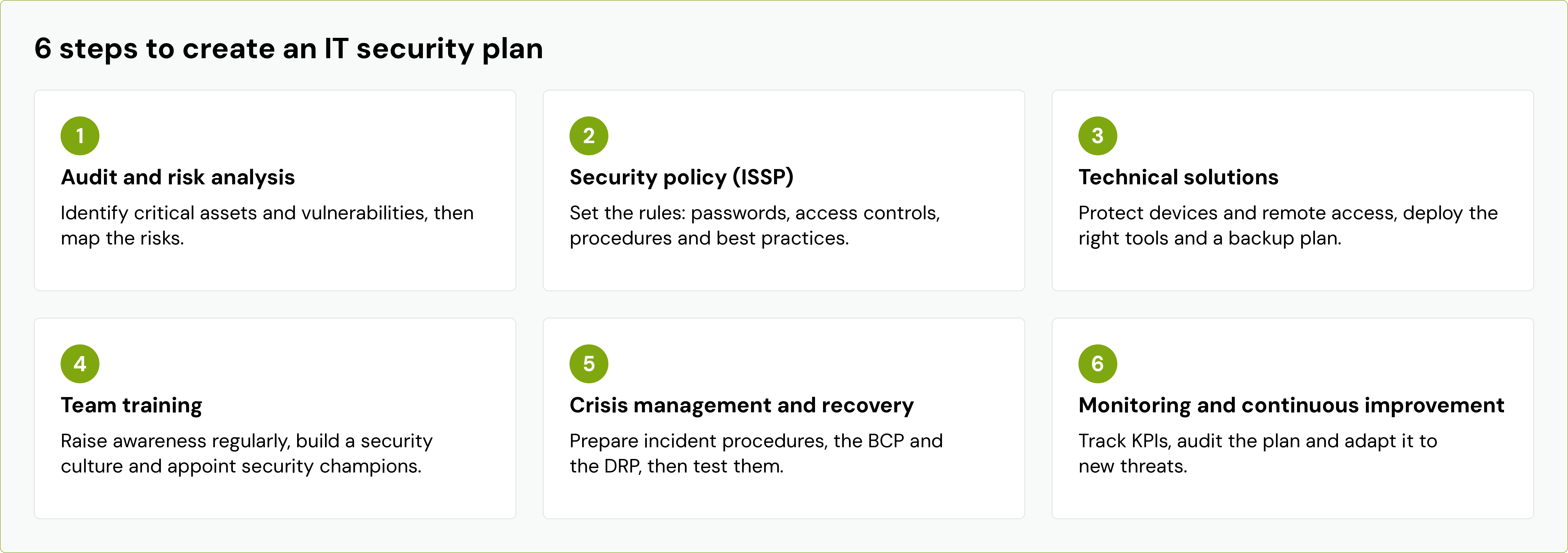
At a glance : an IT security plan is the reference document that organizes the protection of a company's information systems. It is built in 6 steps: analyzing risks, defining a security policy, deploying technical solutions, training teams, preparing for crisis management and business continuity, and then continuously monitoring and improving the system.
Ransomware, phishing, credential theft, data leaks: SMEs are now just as exposed as large corporations, often with fewer resources to defend themselves. Faced with these threats, simply stacking up tools is not enough. What makes the difference is a structured strategy that is shared across the entire organization and regularly updated.
This is precisely the role of an IT security plan. In this guide, you will find a clear definition, the reasons for implementing one in 2026, and a 6-step method for developing an effective cybersecurity plan tailored to the size of your company.
What is an IT security plan?
An IT security plan is a strategic and operational document that defines how a company protects its information systems, data, and users. It outlines the risks to be covered, the rules to be applied, the solutions to be deployed, individual responsibilities, and the procedures to follow in the event of an incident. It is the backbone of your cybersecurity strategy for your company.
Definition and objectives of a cybersecurity plan
A cybersecurity plan translates an ambition ("protecting the business") into concrete, prioritized, and measurable actions. It pursues five main objectives:
- Protect confidentiality of sensitive information: customer data, HR data, trade secrets.
- Guarantee integrity of data, meaning preventing it from being modified or destroyed without authorization.
- Ensure availability of the systems that daily operations depend on.
- Meet compliance obligations : GDPR, NIS2 directive, and contractual requirements from clients and insurers.
- Organize the response in the event of an attack, to limit damage and recover quickly.
In practice, we also refer to a Security Assurance Plan (SAP) when the document is formalized in a contract between a client and an IT service provider. The SAP then outlines the provider's security commitments for the scope they manage.
Difference between a security plan, security policy, and continuity plan
These three concepts are often confused, yet they are complementary:
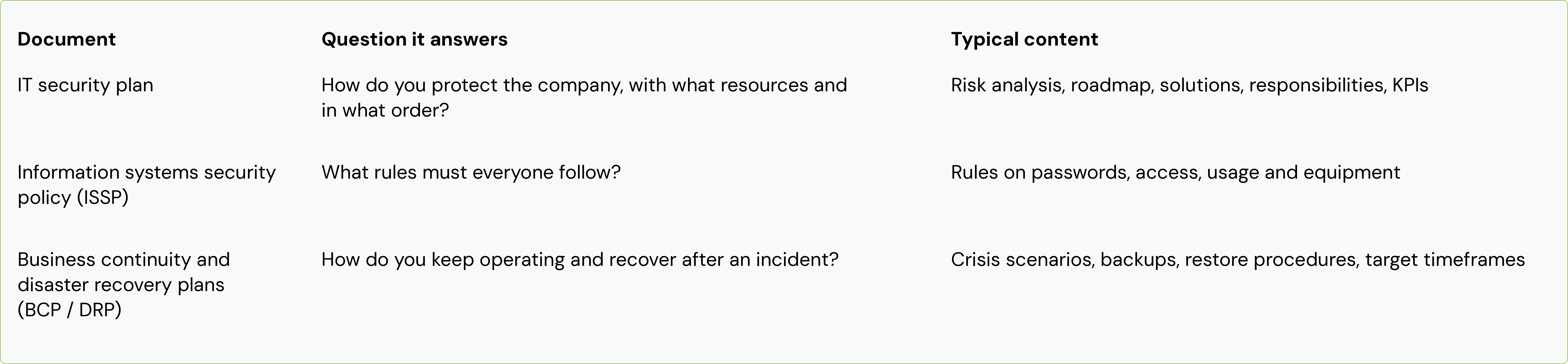
In short, the security policy sets the rules, the BCP and DRP prepare the response to a crisis, and the IT security plan orchestrates it all.
Why implement an IT security plan in a company?
An IT security plan allows you to move from reactive security, managed incident by incident, to proactive, managed security. It addresses three major challenges: protecting against attacks, meeting compliance obligations, and ensuring business continuity.
Protection against cyber threats and attacks
The most common cyberattacks on businesses do not only target large corporations. Phishing, ransomware, identity theft (CEO fraud, fake supplier scams), and compromised Microsoft 365 or Google Workspace accounts: SMEs are often targeted precisely because they are less well-protected.
Artificial intelligence is further increasing the threat. Attackers use it to write error-free phishing emails, mimic an executive's writing style, or automate vulnerability scanning. A security plan helps identify these threats, prioritize protections, and reduce the attack surface methodically, rather than reacting on a case-by-case basis.
Regulatory compliance and legal obligations
IT security is also a legal obligation. Several regulations now govern cyber risk management:
- The GDPR requires the protection of personal data through appropriate technical and organizational measures, and mandates that any data breach posing a risk be reported to the supervisory authority within 72 hours.
- The NIS2 Directive significantly expands the number of companies subject to cybersecurity obligations (risk management, incident reporting, executive accountability). In France, its transposition is being handled through the "Resilience" bill, which was adopted in its first reading by the National Assembly on November 17, 2026, following the Senate. The text must still complete its parliamentary journey before coming into force.
- The DORA regulation, applicable since January 2025, governs the digital resilience of the financial sector and its IT service providers.
Beyond the law, compliance is becoming a commercial requirement: clients, contractors, and cyber insurers increasingly demand proof of a documented security framework. A formalized security plan simplifies these processes.
Risk reduction and business continuity
A successful attack can paralyze a company for days or even weeks: encrypted workstations, inaccessible servers, halted production, and clients who need reassurance. Direct costs (restoration, expertise, potential ransom) are compounded by operational losses and damage to your reputation.
An IT security plan reduces both the likelihood of an incident and its impact. It provides the backups, procedures, and organization needed to maintain critical operations and recover quickly. This is the foundation of cyber resilience: the ability to withstand an attack without the business collapsing.
Step 1: Conduct an IT audit and risk analysis
You can only protect what you know. Every process therefore begins with an assessment: a comprehensive audit of your IT infrastructure and an analysis of the risks facing your business.
Identify critical assets and information systems
List everything of value to the company that must be protected:
- equipment: computers, smartphones, servers, network hardware;
- applications and cloud services: email, ERP, CRM, collaboration tools;
- data: client files, financial data, HR records, intellectual property;
- access: user accounts, administrator accounts, third-party access.
For each asset, ask a simple question: what would the impact on the business be if it became unavailable, was stolen, or was altered? Assets whose loss would bring the company to a standstill are your critical assets.
Assess vulnerabilities and potential threats
Next, identify the flaws that expose these assets: unpatched systems, weak or reused passwords, lack of multi-factor authentication, untested backups, unencrypted workstations, or accounts of former employees that are still active. Cross-reference these with threats realistic for your sector: ransomware, phishing, wire transfer fraud, loss or theft of a laptop, or human error.
A vulnerability scan and a few interviews with your teams are often enough to reveal the main weak points.
Map risks according to their criticality
Each risk is evaluated based on two criteria: its probability and its impact. Combining the two determines its level of criticality. Categorize your risks into three levels:
- Critical : high probability and high impact. To be prioritized in the coming weeks.
- Important : one of the two criteria is high. To be scheduled in the coming months.
- Moderate : limited probability and impact. To be monitored and addressed at a later stage.
This risk map becomes the roadmap for your security plan. It also helps justify investments to management.
Step 2: Define an information systems security policy
The information systems security policy (ISSP) sets the ground rules. It must be clear, concise, and understandable for all employees, not just the IT team.
Establish password management rules
Stolen credentials remain one of the primary entry points for attackers. Your password management policy should include:
- long passwords (a passphrase made of several words is more robust than a short, complex password);
- a unique password for each service, never reused;
- the use of an enterprise password manager;
- mandatory multi-factor authentication (MFA), prioritizing email, remote access, and administrator accounts;
- immediate change of any password in case of suspected compromise.
Implement access controls and procedures
Apply the principle of least privilege: each employee should only access the data and applications they need for their work. Administrator rights should be reserved for a few dedicated accounts, separate from those used for daily tasks.
Also formalize key procedures: onboarding a new employee (creating access, providing secure equipment), job changes, and offboarding (immediate revocation of access, recovery of equipment), as well as contractor access. Poorly managed departures often leave accounts active for months.
Define best practices for users
The ISSP should be accompanied by an IT policy that outlines expected best practices:
- lock your session whenever you leave your workstation;
- do not install unapproved software;
- check the sender and links before clicking;
- do not store professional data on personal devices;
- regulate the use of artificial intelligence tools, avoiding the entry of confidential data;
- report any suspicious behavior or lost equipment immediately.
Step 3: Deploy technical cybersecurity solutions
Once risks have been identified and rules established, you need the right tools. The goal is not to buy as many tools as possible, but to choose those that cover your priority risks.
Choose protection tools adapted to your infrastructure
The tools necessary for your company's cybersecurity form a common foundation, to be adapted to your size and infrastructure:
- Endpoint protection : next-generation antivirus or EDR, capable of detecting suspicious behavior.
- Mobile Device Management (MDM) : to remotely apply updates, encryption, and security policies across your entire fleet.
- Email security : spam and anti-phishing filtering.
- Firewall and network security, including for Wi-Fi.
- Password manager and multi-factor authentication solution.
- Patch management to quickly apply security updates.
Implement an effective IT backup plan
An IT backup plan is your last line of defense against ransomware or a major system failure. The gold standard is the 3-2-1 rule: three copies of your data, on two different media, with one stored off-site. Ideally, add an immutable or offline copy that an attacker cannot encrypt or delete.
Define your backup frequency based on how much data you can afford to lose, and don't forget data hosted in the cloud: Microsoft 365 or Google Workspace are not a substitute for a proper backup. Above all, test your restoration process regularly. A backup that has never been tested is a promise, not a guarantee.
Secure workstations and remote access
The workstation is the primary point of contact between your employees and threats. Every computer must be encrypted, kept up to date, protected by a security solution, and managed remotely so it can be locked or wiped in the event of loss or theft.
With hybrid work, remote access requires special attention: connections via VPN or secure access solutions, mandatory MFA, and checking the device's security status before granting access to company resources.
Step 4: Train and raise team awareness about cybersecurity
The majority of successful attacks exploit human error: clicking a malicious link, opening an attachment too quickly, or authorizing a transfer without verification. Employees are not the weak link in security, provided they are properly trained.
Organize regular training sessions
Annual training is not enough; good habits must be maintained. Focus on short, regular formats tailored to specific roles:
- awareness modules lasting a few minutes, delivered monthly or quarterly;
- simulated phishing campaigns, followed by educational feedback rather than disciplinary action;
- targeted training for high-risk roles: accounting, HR, management, and IT administrators;
- a dedicated session in the onboarding process for every new employee.
Building a culture of cybersecurity
The goal is for security to become a shared reflex, not a constraint imposed by IT. This requires leadership to lead by example, regular communication about current threats, and a climate of trust: an employee who clicks on a suspicious link must be able to report it immediately without fear of blame. Every minute saved in detection limits the impact of an attack.
Appointing security leads within the organization
Appoint a security plan manager to lead the initiative and report to management. In multi-site or multi-team organizations, supplement this with security leads: they share best practices, relay questions from the field, and serve as the first point of contact in case of doubt.
Step 5: Develop a crisis management and business recovery plan
No protection is foolproof. The question is therefore not just "how do we avoid an attack?" but also "what do we do the day it succeeds?"
Defining procedures for security incidents
Draft a simple incident response procedure that everyone knows. It should specify:
- how to detect and report an incident, and to whom;
- initial actions: isolate the workstation or server from the network, do not shut it down abruptly, and preserve evidence;
- the composition of the crisis team: management, IT, communications, legal, and service providers;
- external contacts: IT service provider, cyber insurance, legal counsel, and the Cybermalveillance.gouv.fr platform;
- notification obligations: the CNIL within 72 hours in the event of a personal data breach, filing a police report, and notifying relevant authorities based on your sector;
- internal and external communication with clients and partners.
Keep a hard copy of this procedure and key contacts: in the event of ransomware, your digital files may be inaccessible.
Creating a business continuity and disaster recovery plan
The Business Continuity Plan (BCP) describes how to maintain essential activities during a crisis, using degraded modes if necessary. The Disaster Recovery Plan (DRP) details how to restore systems and return to normal operations.
For each critical activity, set two objectives:
- RTO (Recovery Time Objective): the maximum acceptable duration of an interruption.
- RPO (Recovery Point Objective): the maximum acceptable data loss, which determines the frequency of your backups.
The DRP then defines the order in which systems should be restarted, the resources required, and the individuals responsible for each step.
Regularly test crisis scenarios
A plan that is never tested will not work when the time comes. Organize a crisis exercise at least once a year based on a realistic scenario, such as a ransomware attack on a Friday evening. Also, test the full restoration of a system from backups. Each exercise reveals blind spots: an outdated contact, an imprecise procedure, or a backup that is too slow to restore.
Step 6: Ensure monitoring and continuous improvement of the plan
An IT security plan is never finished. Threats evolve, and so does the company: new employees, new tools, and new locations.
Implement security performance indicators
Track a few simple indicators and present them regularly to management:
- the percentage of workstations that are up-to-date and encrypted;
- the rate of accounts protected by multi-factor authentication;
- the average time taken to apply critical security patches;
- the success rate of backup restoration tests;
- the click-through rate during simulated phishing campaigns;
- the number of incidents detected and their resolution time.
Conduct regular audits and updates
Schedule a full review of the plan at least once a year, and after every significant change: relocation, new critical application, rapid staff growth, or a major incident. An external audit or an occasional penetration test provides a fresh, objective perspective on your security posture.
Adapt the plan to new threats and technologies
Monitor threats and regulatory changes, for example through publications from ANSSI and Cybermalveillance.gouv.fr. Integrate new practices as they emerge: generative AI tools, new SaaS applications, and connected devices. Every new technology must go through the same risk assessment framework as the rest of your information system.
How rzilient supports your cybersecurity strategy
Building and maintaining an IT security plan requires time, skills, and tools that many SMEs lack in-house. rzilient helps you transition to managed, secure IT by covering the three dimensions of your security: the workstation, the employee, and the work environment.
A centralized platform to manage your IT security
With rzilient, you can view your entire IT infrastructure in one platform: equipment, users, workstation security status, and onboarding/offboarding. This centralized view makes it easy to track security plan metrics and lets you know at any time which devices are up to date, encrypted, and protected.
Managed services to reduce your cyber risks by 90%
Our teams handle the daily operation of your infrastructure's security: workstation configuration and hardening, update management, endpoint protection, and access management for new hires and departures. Basic measures that block a large portion of common attacks are applied systematically, without relying on the availability of your internal teams.
Personalized support tailored to your organization
Every company has its own priorities, constraints, and level of maturity. rzilient works with you to identify your priority risks, define rules adapted to your organization, and evolve your security posture as you grow.
Looking to assess the security of your IT infrastructure? Speak with an rzilient expert to identify your priorities and lay the foundation for your security plan.

Frequently asked questions about IT security plans
How long does it take to implement an IT security plan?
For an SME, generally expect a few weeks to conduct the audit, perform the risk analysis, and draft the security policy, followed by a few months to deploy all the measures. The most urgent actions (MFA, updates, backups) can be launched within the first few weeks. The plan is never truly finished: it is then continuously monitored and updated.
What budget should be allocated for an SME cybersecurity plan?
The budget depends on the size of the company, the number of workstations, the sensitivity of the data, and the existing level of security. It consists of three components: the initial audit, the tools (endpoint protection, backup, device management, password manager), and the human time required to administer and maintain the system. Subscription models, billed per user or per workstation, help smooth out these costs and make them predictable. In any case, this budget should be compared to the cost of a successful attack, which is often much higher.
Should you outsource the management of your IT security plan?
This is often the most effective solution for an SME without a dedicated security team. A specialized provider brings advanced skills, pre-established tools, and continuous monitoring that few companies can assemble in-house. The company retains control over decisions and priorities, while the provider handles the technical operations. A hybrid model, with an internal point of contact and an external partner, works particularly well.
What cybersecurity standards must be met in 2026?
The main frameworks to be aware of are:
- GDPR, mandatory for any company that processes personal data.
- The NIS2 Directive, currently being transposed into French law via the "Resilience" bill, which was adopted in its first reading by the National Assembly on November 17, 2026. It will affect many medium-sized companies in sectors deemed essential or important.
- The DORA regulation, for the financial sector and its IT service providers.
- The ISO/IEC 27001 standard, the international benchmark for information security management systems. It is not mandatory, but it is increasingly requested by clients.
- The ANSSI IT hygiene guide, which brings together 42 concrete measures and serves as an excellent starting point for an SME.
Even when a company is not directly subject to NIS2, its clients may be, and they may impose contractual security requirements on it. Anticipating these standards in your IT security plan is therefore a real competitive advantage.