
Implementing a VPN in a company

Secure your IT assets effortlessly
Discover our all-in-one solution

In brief: setting up a business VPN involves creating an encrypted tunnel between employees' devices and company resources to secure remote connections. It takes place in four steps: assessing needs, selecting and configuring the solution, managing users and access permissions, and continuously testing and monitoring the VPN. At rzilient, we offer a turnkey VPN service, from selecting the right solution to day-to-day monitoring.
Whether working remotely, traveling, using hotel or station Wi-Fi, or operating from offices in different countries, your employees connect to company tools from everywhere—and rarely from a trusted network. Every unprotected connection is an opportunity for an attacker to intercept credentials or sensitive data.
A VPN remains one of the simplest and most effective ways to secure remote access. However, it must be chosen, configured, and managed correctly. In this guide, you will find everything you need to know to successfully implement a VPN in your company, from protocols to best practices.
What is a business VPN and why should you use one?
Defining VPNs and how they work in a business environment
A VPN (Virtual Private Network) is a technology that creates an encrypted connection between a device and a network over the internet. In a business context, it allows an employee to access internal resources (servers, shared files, business software) as if they were physically in the office.
It works on a simple principle: the VPN software installed on the employee's computer or smartphone establishes a "tunnel" with a VPN server hosted either at the company or by a provider. All data traveling through this tunnel is encrypted. Even if someone intercepts the connection, for example on public Wi-Fi, they will only see an unreadable stream. Before opening the tunnel, the server verifies the identity of both the user and their device.
Benefits of a VPN for SMEs and large enterprises
Regardless of size, a VPN provides several tangible benefits for any company:
- Secure remote work: employees access internal tools from home, while traveling, or at a client site without exposing data.
- Protect connections on public networks: hotel, airport, café, or coworking space Wi-Fi.
- Control access: only authorized users and devices can reach sensitive resources.
- Connect multiple sites: a site-to-site VPN connects networks from different offices as if they were one.
- Meet compliance requirements: traffic encryption helps protect personal data as required by GDPR and provides peace of mind to clients and partners.
Differences between personal and business VPNs
Personal VPNs, often seen in advertisements, are primarily used to mask an IP address or access content from other countries. Business VPNs serve a different purpose: protecting access to company resources and maintaining control over them.
In practical terms, a business VPN offers a centralized management console, integration with user directories, multi-factor authentication, profile-based access rules, connection logging, and dedicated support. A personal VPN offers none of these features and should never be used to secure company access.
The different VPN solutions for businesses
Hardware VPN vs. software VPN: which should you choose?
A hardware VPN relies on dedicated equipment: a firewall or router with VPN capabilities installed on the company's premises. It delivers strong performance and is well suited for interconnecting multiple sites. However, it requires an upfront investment, technical expertise for configuration, and regular maintenance.
A software VPN (or cloud VPN) operates via a server hosted by a provider and an app installed on each device. It deploys quickly, scales effortlessly with user numbers, and can be managed remotely from a centralized console. It is the ideal solution for SMBs and remote or globally distributed teams.
Many companies combine both: a hardware VPN to connect offices, and a software VPN for remote employees. To explore this choice in greater detail, check out our guide on how to choose a business VPN.
The main VPN protocols (IPSec, OpenVPN, WireGuard, etc.)
The protocol defines how the tunnel is created and how data is encrypted. It directly impacts the security, performance, and compatibility of the VPN.
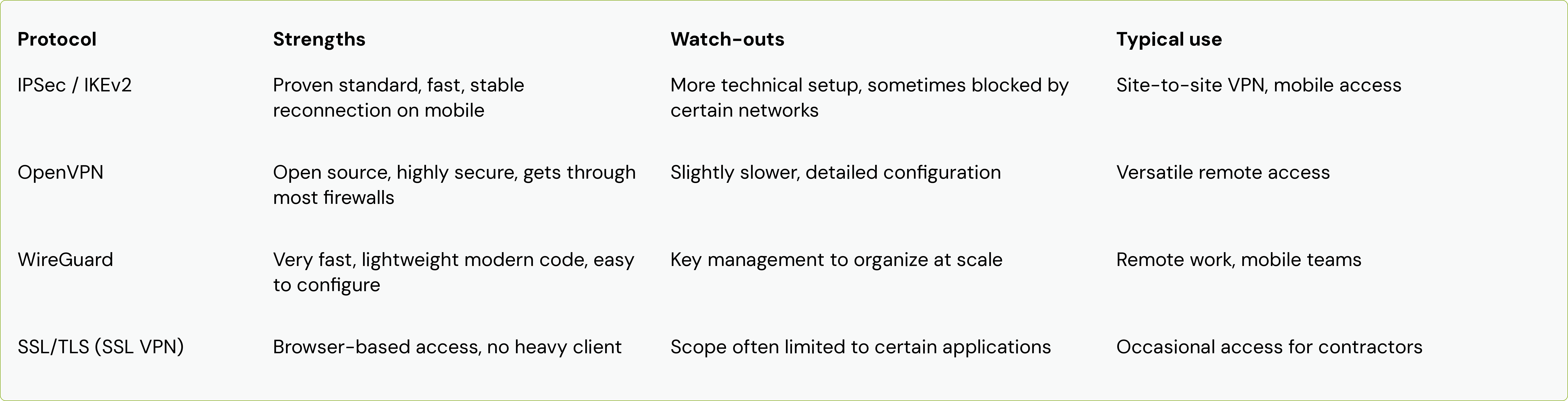
Conversely, older protocols like PPTP are now considered insecure and should be avoided.
Criteria for choosing a VPN for your organization
Before choosing a solution, evaluate it against these criteria:
- Security: modern protocols, robust encryption, multi-factor authentication, and a no-logs policy.
- Performance: speed, number and location of servers, and connection stability.
- Centralized management: administration console, quick user onboarding and offboarding, and profile-based access rules.
- Compatibility: Windows, macOS, iOS, Android, and integration with your directory (Microsoft Entra ID, Google Workspace).
- Scalability: ability to keep pace with your team's growth and the opening of new sites.
- Support: responsive assistance, quick turnaround times, and implementation guidance.
- Cost: per-user subscription, deployment fees, and internal management costs.
Key steps for implementing a corporate VPN
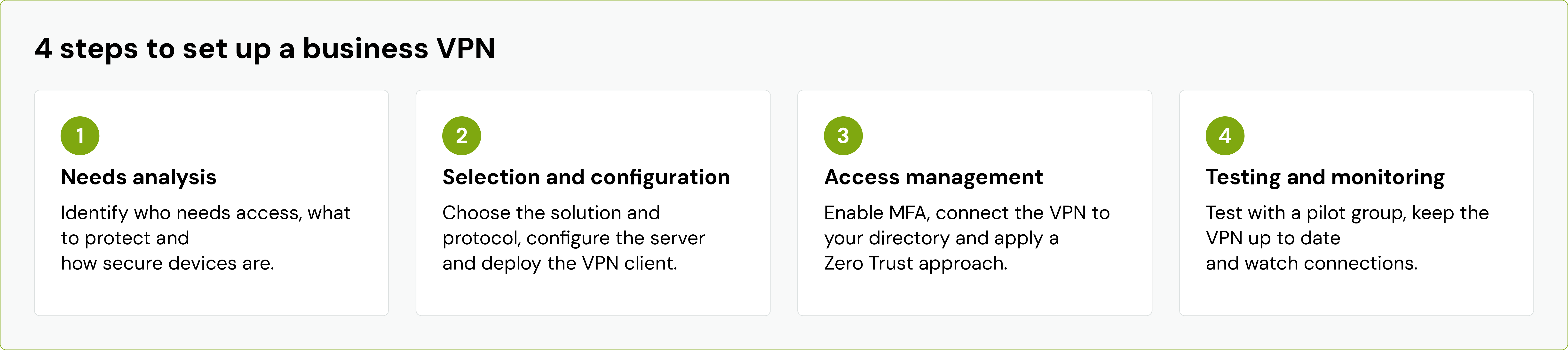
Implementing a corporate VPN involves four steps: analyzing needs, selecting and configuring the solution, managing users and access, and finally, testing and monitoring the VPN over time.
Needs analysis and security audit
Start by answering a few simple questions: how many employees need remote access? From which countries and devices? What resources do they need to access (file servers, ERP, internal tools)? Do you also need to connect multiple offices?
Take this opportunity to conduct a security audit of your infrastructure: identify sensitive data, existing access privileges, and potential vulnerabilities, such as unpatched workstations or shared accounts. While a VPN encrypts connections, it does not protect an already compromised computer: workstation security is an essential prerequisite.
Selecting and configuring the VPN server
Once your needs are defined, select the solution (hardware, software, or both) and the appropriate protocol. Configuration then focuses on several parameters:
- the VPN server: location, capacity, and failover redundancy;
- the chosen encryption and protocol;
- routing mode: does all traffic pass through the VPN, or only traffic destined for company resources (split tunneling);
- access rules: which resources are accessible to which profiles;
- VPN client deployment on devices, ideally automated via a Mobile Device Management (MDM) tool to avoid manual, per-machine installations.
Managing users and access (Zero Trust, MFA, identity management)
A VPN should not become a wide-open door to your internal network. Apply three principles:
- Multi-factor authentication (MFA): a password alone is not enough. A code or smartphone validation blocks the vast majority of access attempts using stolen credentials.
- Identity management: connect the VPN to your directory (Microsoft Entra ID, Google Workspace) so that access is created when an employee joins and automatically revoked when they leave.
- Zero Trust approach: never trust by default. Each user only accesses the resources they need, and the device's security posture is verified before every connection.
Testing, maintenance, and VPN monitoring
Before a full-scale rollout, test the VPN with a pilot group: check connections from different networks and countries, speed, resource access, and behavior during outages. Adjust the configuration, then deploy gradually.
Afterward, the VPN must be maintained like any other critical piece of your infrastructure: prompt application of security updates, monitoring for unusual connections (times, countries, volumes), regular reviews of active accounts, and performance tracking.
Best practices and mistakes to avoid when deploying a VPN
A poorly configured or managed VPN provides a false sense of security. Here are the best practices to apply and the most common mistakes to avoid.
Securing passwords and access
VPN credentials are a primary target for attackers: with a single compromised account, they gain direct access to the internal network. To protect them:
- enforce long, unique passwords stored in an enterprise password manager;
- systematically enable multi-factor authentication, with no exceptions for executives or administrator accounts;
- ban shared accounts: every employee must have their own access to maintain connection traceability;
- immediately revoke access upon departure or a change in role.
Common mistake: leaving VPN accounts active for former employees or contractors whose projects have ended.
Raising employee awareness of cybersecurity
The best VPN is ineffective if employees don't use it. Explain why it is important, when to activate it (especially on public Wi-Fi), how to spot phishing attempts targeting their credentials, and who to report suspicious behavior to. A short session during onboarding, supplemented by regular reminders, is often enough to instill good habits.
Common mistake: making the VPN optional. Whenever possible, configure an automatic connection as soon as the device leaves the company network.
Integrating the VPN with other IT and HR tools
A VPN managed in isolation quickly becomes a source of errors. Integrate it into your ecosystem:
- with your identity directory, to automatically synchronize accounts and permissions;
- with your mobile device management (MDM) tool, to deploy and update the VPN client on all devices and verify their compliance;
- with your HRIS, so that arrivals and departures automatically trigger the creation or deletion of access;
- with your security monitoring tools, to centralize alerts.
This integration reduces management overhead and limits oversights, which are a leading cause of security breaches.
Going further: resources, tools, and support
Setting up a VPN requires expertise in networking, security, and identity management, as well as time for daily administration. For an SME without a dedicated IT team, or for an already overstretched IT team, outsourcing this management is often the safest solution.
Managed solutions and outsourced IT support
With a managed VPN solution, a service provider takes care of selecting the solution, configuring it, deploying it on devices, managing access, and providing ongoing monitoring. The company retains control over decision-making without having to manage the technical side.
This is precisely the service we provide at rzilient. Our VPN service is powered by partner solutions tailored to your needs and budget, featuring advanced data encryption and multi-device support across computers, smartphones, and tablets. You can delegate all or part of the management to us, depending on your organization.
The support process takes place in three stages:
- Project validation: we analyze your needs and you receive a clear quote with no unpleasant surprises.
- Deployment: our experts plan and deploy the solution on your devices, in coordination with your existing tools.
- Follow-up: our dedicated support team assists you at every step and answers your questions throughout our partnership.
A VPN is part of a broader approach to fleet security: securing workstations, managing identity and access, and training teams. Looking to secure your team’s connections? Speak with an rzilient expert to identify the right solution for your business.
FAQ on implementing a corporate VPN
Does a VPN slow down the internet connection?
A VPN can cause a slight drop in speed due to encryption and routing through an intermediary server. With a modern professional solution, this drop is generally barely noticeable in daily use. To minimize it, prioritize a high-performance protocol like WireGuard or IKEv2, servers close to your users, and split tunneling, which only routes traffic destined for company resources through the VPN.
What are the costs associated with setting up a VPN?
The cost depends on the type of solution. A software VPN is most often billed as a monthly subscription per user. A hardware VPN involves purchasing equipment, as well as its configuration and maintenance. Added to these costs are the time spent on deployment, administration, and support, which is often underestimated. A managed solution bundles everything into a predictable budget. At rzilient, you receive a clear quote tailored to your number of users and your specific needs.
How do you manage VPN access for international employees?
Choose a solution with servers in the regions where your teams work to ensure high performance. Centralize access management in a single console linked to your directory to apply consistent rules everywhere. Enable multi-factor authentication and monitor unusual connections, such as those from countries where you have no staff. Finally, check for any legal restrictions on VPN usage in specific countries.
What should you do in the event of a VPN outage or security breach?
In case of an outage, have a backup plan ready: redundant servers, alternative access procedures, and responsive support. If a breach or compromised account occurs, act quickly: disable the affected access, reset credentials, apply the vendor's security patch, and analyze logs to assess the impact. If personal data was exposed, you may be required to notify the relevant data protection authority within 72 hours. Using a provider that monitors your VPN 24/7 allows for much faster detection and resolution of these incidents.