
Battery status, RAM usage...: how to maintain a healthy computer park?

Centralized management of your IT assets
Discover our all-in-one solution

Providing computer equipment to all your employees is a considerable financial investment for every business.
So wanting to know the health status of each piece of equipment and ensure adequate maintenance to maximize their use is normal—if not smart!
Without regular monitoring of indicators of the health of a computer park, breakdowns can occur at any time, affecting the productivity of your teams and increasing the costs of reparation or replacement.
But how can you monitor these indicators without spending too much time on them?
This is exactly the question that the Rzilient teams have been working on in recent months.
The result...
✨ our telemetry agent ✨
... designed to monitor the health status of your IT fleet.
This novelty accesses the hardware data of your equipment in real time, alerts you to the slightest problem and gives you practical advice to take care of your IT equipment.
Let's find out together how this feature can extend shelf life of your devices while reducing your costs!
Let's go!
Why monitoring the health of your IT equipment is essential
First of all, let's start at the beginning! The why.
We're not going to lie to each other, a computer that breaks down at the worst moment is a real nightmare. And that's not the only issue.
1. Reduce renewal costs
Replacing computers too often is a financial drain. En extending their lifespan, you are reducing the frequency of purchases.
On average, replacing a computer can cost between 800 and 1,500 euros. Imagine that you have a fleet of 50 computers: that's up to 75,000 euros renewal every 3 to 5 years. Monitoring the health status of your equipment can extend their lifespan by 1 to 2 years, allowing you to save up to 30% of these costs. Just that!
With Rzilient's telemetry agent, you know Exactly when and wherefore A device starts to show signs of weakness, allowing you to take action before it is too late.
2. Avoid breakdowns and maintain productivity
A computer that crashes while working is the loss of productivity assured! The worst part is that most of these outages could be avoided if the warning signs were monitored.
Interruptions due to computer failures are also expensive, but in times this time. According to a study, a hardware failure costs a business 1 to 3% of its annual productivity. It is on average 2 days of work lost per employee per year. With the telemetry agent, you can reduce these unexpected shutdowns of up to 40%, by anticipating failures and by replacing components before they fail completely.
3. Reducing environmental impact
The manufacture of a computer produced between 200 and 500 kg of CO2, depending on its size and components. Multiply that by the number of devices you use, and that's a lot. Extend the life of your equipment by only One year can reduce your CO2 emissions by 30 to 50% per device. A gesture that is not only good for your business, but also for the planet!
4. Protect your sensitive data
A broken computer is often the result of lost or corrupt data. And that's even worse if this data is Sensitive for your business. According to a study by the Ponemon Institute, a company that suffers from data loss can lose on average 3.86 million euros by incident. By monitoring the health of your computers, you can avoid these unexpected losses and reduce the risk of seeing your sensitive data disappear due to a failed hard drive or battery.
What indicators should you monitor in order to maintain a healthy computer park?
Now, you might be asking yourself: what indicators should I track?
Our experts' recommendation: start with the battery, SSD storage, and RAM, because they're the ones that often cause the biggest concerns.
1. Battery status
Remember that day when your battery failed you in the middle of a meeting? It is not inevitable! Here's what you need to look out for:
Risks if not followed : A faulty battery can cause unexpected shutdowns or decrease overall computer performance.
Meaning of the indicators:
- If health is under 60% : Consider replacing the battery. This will prevent the device from turning off too quickly and allow you to use it longer without interruption.
- If health is between 60 and 80% : Monitor battery status regularly. Have the device checked periodically to plan for possible replacement.
- If health is above 80% : Use the device normally, but try not to let the battery drain completely before recharging. This will help maintain good health.
Actions in case of bad condition : Once the battery is too degraded, replace it immediately. Leaving it around will only make things worse!
2. SSD storage space
The SSD is a bit like your brain's memory: when it is saturated, everything becomes slow, even unstable. Here's what to look out for:
Risks if not followed : A full or faulty SSD slows down the computer and exposes the computer to the risk of data corruption.
Meaning of the indicators:
- If the storage is above 80% : Free up space by deleting files you no longer need or by moving them to an external hard drive or online storage service instead of on your device (Cloud, Drive).
- If the storage is between 50% and 80% : Sort your files regularly. Make sure you always have enough free space for new apps and updates.
- If the storage is under 50% : Continue to use the device normally, but back up important files regularly to avoid data loss.
Actions in case of bad condition : Delete junk files, transfer data to an external drive or to the cloud, and consider a replacement of the SSD if the indicators point to frequent errors.
3. RAM (RAM)
La RAM is what allows your computer to handle multiple tasks at the same time. But if it's constantly overloaded, your computer slows down. Here's what to do:
Risks if not monitored : An overload of RAM causes frequent slowdowns and crashes.
Meaning of the indicators:
- If the storage is above 80% : Free up space by deleting files you no longer need or by moving them to an external hard drive or online storage service instead of on your device (Cloud, Drive).
- If the storage is between 50% and 80% : Sort your files regularly. Make sure you always have enough free space for new apps and updates.
- If the storage is under 50% : Continue to use the device normally, but back up important files regularly to avoid data loss.
Actions in case of overload : If your RAM is overloaded, consider a hardware update (adding RAM) or optimize the use of software on the device.
How to track these indicators with Rzilient's telemetry agent
Now you know what to look out for. The question still remains: How to do it easily ?
This is where theRzilient telemetry agent come into play. It allows you to collect all these indicators in real time and to alert you in case of problems.
1. For every device
With the telemetry agent installed on your computers, you can track The health condition of each machine in real time under the “performance” section.

For your computer park
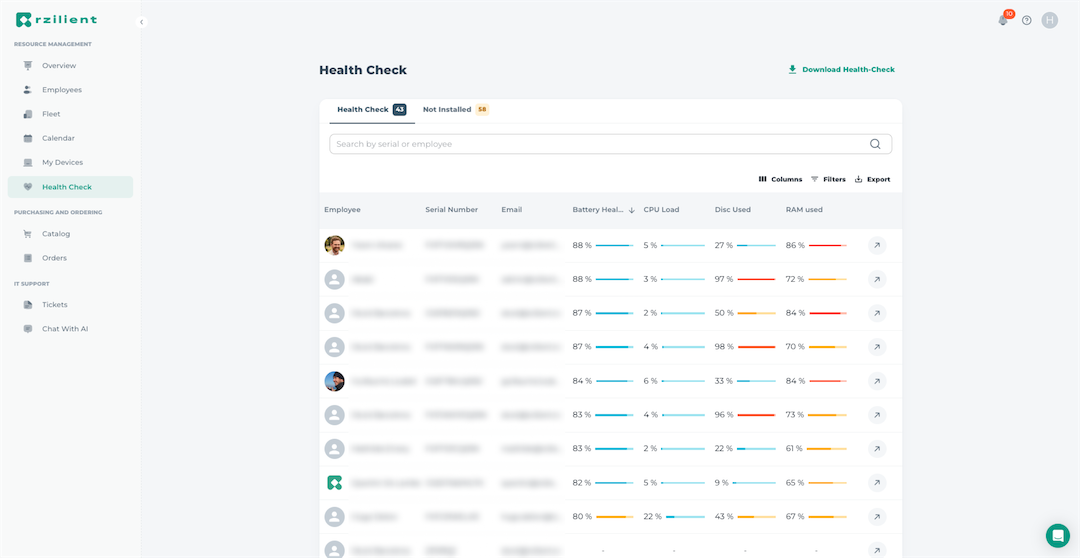
Under the Health Check tab, you can see all the indicators of your computer equipment in order to quickly detect devices in need of maintenance.
To go further
In addition to monitoring on the platform, Rzilient offers personalized audit reports, based on the analysis of telemetry data, to help you detect overloads and poor performances of certain indicators.
This personalized report contains a detailed action plan, allowing you to detect, optimize and plan maintenance actions on your IT equipment in need.
How to install the Rzilient Telemetry Agent in 3 steps
Ready to install thetelemetry agent The resilient one?
If you are already a customer:
- Download the agent since This page.
- Install it on your equipment by following the step-by-step instructions provided in the documentation.
- If you want to launch the installation on all the equipment in your computer park, ask your account manager!
- Once installed, the agent will immediately start collect performance data of the devices and will send you alerts as soon as a problem is detected.
You don't have to do anything except enjoy a automated tracking that will save you time and preserve your equipment.
If you are not a customer:
Start with book a demo with our teams 🙋
With theRzilient telemetry agent, you can Sleep soundly knowing that your computer equipment is under control. You always know if a device needs intervention, allowing you to keep your equipment healthy while protecting your sensitive data.
.webp)
.webp)
.webp)
.webp)