IT server maintenance: a complete guide to securing your infrastructure in 2026

Centralized management of your IT assets
Discover our all-in-one solution

Your server runs your business software, hosts your shared files, manages user access, and often handles your backups. When it goes down, the entire company grinds to a halt. Yet, in many SMEs, server maintenance is still limited to fixing things only when they break.
This approach is costly: service interruptions, data loss, and security breaches exploited by increasingly targeted cyberattacks. Conversely, regular and structured IT server maintenance ensures business continuity, prevents downtime, and keeps your IT costs under control.
In this guide, you will find everything you need to know to maintain your server in 2026: definitions, key components, steps to build a preventive maintenance plan, and a comparison between internal management and managed IT services.
What is IT server maintenance?
IT server maintenance encompasses all actions that keep a server available, secure, and high-performing over time. It is part of a broader approach to IT maintenance, but with a specific challenge: a server is not an isolated workstation. It serves multiple users, often the entire company, simultaneously.
Definition and scope of server maintenance
In practical terms, server maintenance covers three complementary levels:
- Hardware : status of disks, power supply, cooling, temperature, memory, and RAID controllers. A failing component often shows signs before it breaks; you just need to monitor them.
- Software : operating system, hypervisor, firmware, hosted applications, antivirus, and security tools. Each layer must receive its updates and patches.
- Data and access : backups, user permissions, administrator accounts, event logs, and firewall rules.
Server maintenance is therefore not limited to "fixing it when it breaks." It encompasses monitoring, preventive care, security patch management, backup verification, and documentation of interventions. This comprehensive approach is what ensures the availability of the service provided to users.
The different types of servers involved
Not all companies have the same infrastructure, but most SMEs use one or more of these servers:
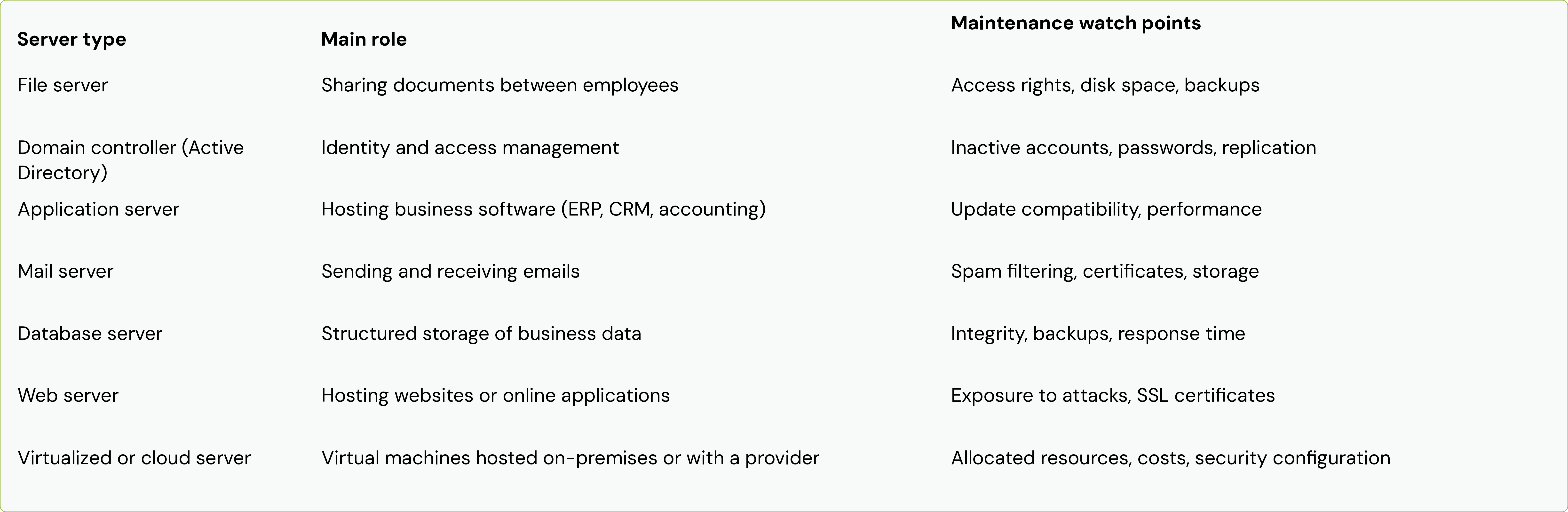
Whether physical in a server room, virtualized, or hosted in the cloud, a server requires maintenance. The cloud shifts part of the hardware responsibility to the provider, but configuration, application updates, access management, and backups generally remain the responsibility of the company.
Why is server maintenance essential for your business?
A well-maintained server goes unnoticed: it just works. That is precisely why maintenance is often pushed to the background, until the day an incident reminds you just how critical it is. Here are the three major benefits of regular server maintenance.
Ensuring business continuity and availability
When the file server is inaccessible, your teams cannot work on their files. When the application server goes down, billing, payroll, or order processing grinds to a halt. Every hour of downtime translates into lost time, dissatisfied customers, and sometimes contractual penalties.
Server maintenance is primarily about ensuring business continuity. By regularly checking hardware status, disk space, processor load, and service health, you significantly reduce the likelihood of an unexpected outage. And if a failure does occur, tested backups and a documented recovery procedure allow you to get back up and running quickly.
Preventing failures and reducing security risks
Most server failures do not happen without warning. A disk accumulating bad sectors, rising temperatures, or recurring errors in system logs: these subtle signals are visible long before a failure occurs, provided they are monitored.
On the security front, the stakes are even higher. Cyberattacks very often exploit known vulnerabilities for which a patch already exists. A server with an outdated operating system, unmonitored administrator accounts, or unnecessarily open ports becomes an entry point for ransomware. Rigorous maintenance, including applying security patches and reviewing access, helps protect the system against intrusions and reduces your risk exposure.
Optimizing performance and reducing IT costs
A cluttered, poorly configured, or undersized server slows down all its users. Cleaning up temporary files, optimizing databases, and adjusting resources allocated to virtual machines: these simple actions maintain optimal performance on a daily basis.
Maintenance also has a direct impact on the budget. Emergency intervention is almost always more expensive than planned maintenance, not to mention the cost of the interruption itself. Extending hardware lifespan, anticipating renewals, and avoiding rushed purchases are all ways to reduce IT costs sustainably.
Key components of IT server maintenance
Effective server maintenance relies on five complementary pillars. None is sufficient on its own: it is their combination that secures the infrastructure.
Preventive maintenance: anticipating to better protect
The preventive maintenance involves intervening before a problem arises. For a server, this includes:
- checking disk health (SMART indicators, RAID array status);
- monitoring temperature and cleaning dust from physical hardware;
- cleaning up logs, temporary files, and obsolete profiles;
- checking available disk space and volume growth;
- monitoring certificates, licenses, and warranty contracts nearing expiration;
- reviewing inactive user and administrator accounts.
The goal is simple: detect wear and drift before they turn into incidents. This is the area that offers the best return on investment, as every avoided failure means one less service interruption.
Corrective maintenance: responding effectively to incidents
Even with solid prevention, incidents occur: a failing component, an update that creates an incompatibility, or a service that fails to restart. Corrective maintenance covers the interventions that restore normal server operation.
Its effectiveness depends primarily on preparation. An incident is resolved faster when:
- alerts reach the right person immediately thanks to monitoring;
- architecture and configurations are documented;
- backups are recent and their restoration has been tested;
- critical parts or manufacturer warranty contracts allow for rapid replacement.
After each incident, a brief root cause analysis helps prevent recurrence and enriches the preventive maintenance plan.
Real-time monitoring and supervision
Supervision is the nervous system of server maintenance. Monitoring tools continuously collect metrics and trigger an alert as soon as a threshold is crossed.
The priority indicators to monitor are:
- processor (CPU) load, which reveals overloading, a stuck process, or a need for resizing;
- memory usage (RAM), to identify memory leaks or insufficient resources;
- disk space, as saturation can cause services to stop;
- disk and RAID status, which signals imminent hardware failure;
- temperature and ventilation, to prevent overheating;
- service availability, to detect stopped application or network services;
- security logs, which flag suspicious login attempts or abnormal activity;
- backup results, so you never discover a failed or incomplete backup too late.
Effective monitoring transforms maintenance: instead of discovering a problem when users complain, the IT team often intervenes before they even notice.
Managing updates and security patches
Update management, or patch management, covers the operating system, firmware, hypervisor, and hosted applications. It is one of the most important practices for server security, as it closes known vulnerabilities before they can be exploited.
On a server, you don't just apply patches haphazardly. A reliable approach follows a few rules:
- Inventory the systems and software that need to be kept up to date.
- Prioritize critical security patches for rapid deployment.
- Test updates in a staging environment or on a less critical server whenever possible.
- Schedule a maintenance window outside of business hours.
- Perform a backup or snapshot immediately before the intervention.
- Verify that services are functioning correctly after rebooting and log the intervention.
Also, be mindful of systems that have reached end-of-support: an operating system that no longer receives security patches poses a major risk and must be included in a migration plan.
Regular backups and disaster recovery plan
Backups are your last line of defense against a major outage, human error, or ransomware. The gold standard remains the 3-2-1 rule: three copies of your data, on two different media, with one stored off-site. Increasingly, companies are adding an immutable or offline copy that an attacker cannot encrypt or delete.
However, a backup is only valuable if it can be restored. Regularly test file restoration and, more occasionally, the restoration of an entire server.
A disaster recovery plan (DRP) goes further: it outlines who does what, and in what order, to get operations back up and running after a disaster. It sets two key objectives: the maximum acceptable downtime (RTO) and the maximum acceptable data loss (RPO). These two values determine the frequency of backups and the level of redundancy required.
How to implement an effective server maintenance plan
A maintenance plan turns good intentions into a reliable routine. It is built in four steps.
Audit your existing infrastructure
You can only maintain what you know. The first step is to conduct a comprehensive assessment:
- inventory of physical, virtual, and cloud servers, along with their roles;
- hardware age, active warranties, and system end-of-support dates;
- applications and services hosted on each server;
- dependencies between servers, network, and software;
- current backup setup and the date of the last restoration test;
- security level: overdue patches, privileged accounts, exposure to the internet.
This audit often reveals blind spots: a server forgotten in a closet, a backup that has been failing silently for weeks, or a system that is no longer supported.
Define priorities and critical servers
Not all servers carry the same weight for your business. Rank them according to the impact of their downtime: what happens if this server goes down for an hour, a day, or a week?
Critical servers (domain controllers, business software, customer databases) deserve enhanced monitoring, more frequent backups, potential redundancy, and short response times. For each one, set realistic availability and recovery objectives. This ranking will then guide all your decision-making, including budget allocations.
Establish a preventive maintenance schedule
A preventive maintenance plan relies on a clear schedule. Here is a baseline to adapt to your specific context:
- Continuous : monitoring indicators, managing alerts, and verifying automatic backups.
- Weekly : reviewing alerts and event logs, and checking disk space.
- Monthly : applying security patches, reviewing accounts and access rights, and testing file restoration.
- Quarterly : analyzing performance and capacity, updating firmware, and reviewing firewall rules.
- Annually : performing a full disaster recovery plan test, conducting a security audit, and reviewing the hardware lifecycle.
Schedule tasks that require a reboot during maintenance windows known to everyone, outside of business hours.
Document procedures and interventions
Documentation is often neglected, yet it is essential for rapid response during a crisis. It must cover:
- architecture diagrams and the configuration of each server;
- recurring procedures (updates, restarts, restoration);
- access details and useful contacts (vendors, manufacturer support, service providers);
- an activity log: date, action performed, person responsible, and outcome.
Up-to-date documentation reduces dependency on a single individual. If your administrator is away or leaves the company, server management continuity remains ensured.
In-house maintenance vs. IT managed services: which solution to choose
Once your needs are clear, the question remains: who will handle daily server maintenance? Companies have two main options, along with hybrid models that fall between the two.
The advantages and limitations of in-house maintenance
Entrusting maintenance to an internal team offers real benefits: a deep understanding of the company and its workflows, immediate proximity to users, and direct control over priorities.
For an SME, however, the limitations quickly become apparent:
- Rare and expensive skills : system administration, security, backup, networking, and cloud. It is difficult to combine all these areas of expertise in one or two people.
- Limited availability : vacations, sick leave, or staff turnover. A server failure will not wait for the administrator to return.
- Demanding security monitoring : tracking vulnerabilities and applying patches requires time that the IT team, often absorbed by daily support tasks, does not always have.
- Tools to finance : monitoring, backup, patch management, and endpoint security.
A frequent result: preventive maintenance takes a backseat to daily emergencies.
IT managed services for SMEs: benefits and ROI
IT managed services involve outsourcing all or part of your information system management to a specialized IT provider. For server maintenance, this generally includes:
- continuous monitoring with alerts handled by experts;
- structured management of updates and security patches;
- monitored backups and regular restoration testing;
- response times governed by a Service Level Agreement (SLA);
- regular reporting on infrastructure status.
The return on investment is measured on several levels. Costs become predictable, with a monthly subscription rather than emergency expenses. Service interruptions decrease, which protects productivity. Security levels increase without the need to recruit hard-to-find talent. Finally, your internal teams can focus on value-added projects rather than day-to-day operations.
In short, internal maintenance benefits from a deep knowledge of the company, but remains limited by the skills and availability of the existing team. Costs are variable, with spikes during every incident, and security monitoring is often pushed aside due to a lack of time.
IT managed services provide a broader range of skills, shared among experts, and availability guaranteed by contract. Costs are smoothed out into a monthly subscription, security patches follow dedicated processes, and monitoring and backup tools are included in the service. Knowledge of your company is something that is built over time.
For many SMEs, a hybrid model works well: an internal point of contact maintains the relationship with business departments, while the provider handles supervision, security, and technical operations.
How rzilient supports companies with their server maintenance
At rzilient, we champion a simple vision: IT that is managed and secure, and that never slows your teams down. Our role is to take the burden of technical management off your shoulders so that your IT remains available, up-to-date, and protected.
Specifically, we support you by:
- auditing your infrastructure and identifying critical servers, risks, and priorities;
- monitoring your equipment and detecting problems before they turn into outages;
- applying updates and security patches in a planned and controlled manner;
- securing your data with monitored backups and a tailored recovery strategy;
- give you visibility into the status of your infrastructure and your IT costs.
Need to take stock of your server maintenance? Talk to an rzilient expert to identify your risks and build a maintenance plan tailored to your business.
Frequently asked questions about server maintenance
What is the ideal frequency for preventive server maintenance?
There is no single frequency, but a standard rhythm works for most SMEs: continuous monitoring, weekly checks of alerts and disk space, monthly application of security patches, quarterly performance reviews, and an annual disaster recovery plan test. Critical security patches should be applied as soon as possible, without waiting for the monthly window. The more critical a server is, the tighter this schedule should be.
How much does IT server maintenance cost in 2026?
The cost depends on the number of servers, their criticality, the expected service level, and the scope covered (monitoring only, backup, security, on-site interventions). As a guide, managed services contracts are most often billed as a monthly flat fee per server, with an amount that varies significantly based on response time commitments and included tools. Ad-hoc interventions are generally billed by the hour or by the day.
When comparing offers, look beyond the price: check the exact scope, guaranteed response times, included restoration tests, and reporting. And keep in mind the cost of an unexpected outage, which is often much higher than that of annual maintenance.
What are the signs that a server needs urgent maintenance?
Certain symptoms should alert you immediately:
- unusual slowdowns or increasing response times;
- unexpected reboots or services stopping on their own;
- abnormal noises, fan running at full speed, or overheating;
- alerts regarding disk or RAID status;
- disk space nearly full;
- failed backups;
- repeated errors in system logs;
- suspicious connections or activity in security logs;
- an operating system that is no longer supported by the vendor.
If you notice one or more of these signs, don't wait for a failure: have the server diagnosed and check the status of your backups immediately.
How can you secure a server against intrusions and cyberattacks?
Server security relies on several complementary layers of protection:
- Apply security patches quickly, for both the system and applications.
- Reduce the attack surface : disable unnecessary services, close unused ports, and limit exposure to the internet.
- Control access : principle of least privilege, individual and restricted administrator accounts, and multi-factor authentication.
- Protect the server with an appropriate security solution (next-generation antivirus, EDR) and a properly configured firewall.
- Monitor logs to quickly detect abnormal behavior.
- Encrypt sensitive data and administrative traffic.
- Maintain isolated backups that are regularly tested, so you can restore even in the event of ransomware.
Security is not a one-time setup: it is a continuous process that is an integral part of IT server maintenance.