
IT outsourcing: why and how to do it in 2026?

Centralized management of your IT assets
Discover our all-in-one solution

In brief: IT outsourcing involves a company delegating part or all of its IT management to a specialized provider—covering support, maintenance, fleet management, and cybersecurity. It allows businesses to focus on their core activities, access specialized expertise, and keep costs under control. Successful outsourcing comes down to five key steps: defining your needs, drafting specifications, selecting the right provider, securing the contract, and steering the partnership.
Hiring a system administrator, a cybersecurity expert, and a support technician is expensive, especially for an SME. Yet, IT needs are constantly growing: more SaaS tools, more remote work, more cyber threats, and more compliance requirements. As a result, in many companies, IT falls on an office manager, an already overwhelmed CTO, or a staff member who "knows a bit about computers."
IT outsourcing provides an answer to this gap. In this guide, you will discover what it covers, why you should use it, how to implement it step-by-step, which clauses to include in the contract, and how to avoid the main risks, with concrete examples of companies that have taken the leap.
What is IT outsourcing?
Definition and scope of IT outsourcing
IT outsourcing is a process by which a company, known as the client, entrusts a third-party company, the IT service provider, with the execution of all or part of its IT tasks. The provider carries out these missions according to specifications and commitments defined in an outsourcing contract.
The scope can be very specific (a migration project, software deployment) or recurring (user support, IT maintenance, security monitoring). In all cases, the client remains the owner of their information system and responsible for its high-level direction: they delegate execution, not strategy.
Difference between outsourcing and managed IT services
The two terms are often used as synonyms, but they do not cover exactly the same reality:
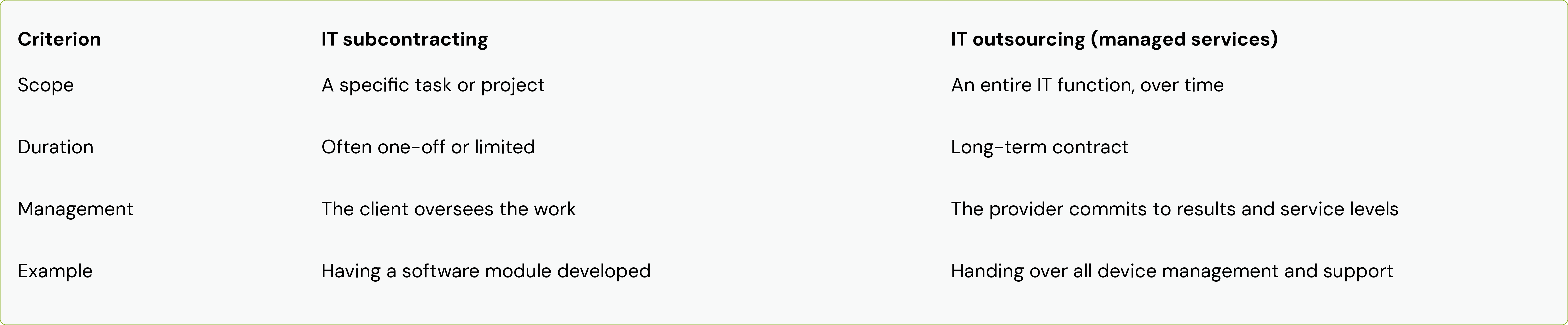
In practice, the line is blurred: many companies start by outsourcing a specific task, then gradually expand the scope until they fully outsource their IT management.
Key areas involved: maintenance, cybersecurity, fleet management
Three areas account for the majority of needs for SMEs and mid-market companies:
- The IT maintenance: updates, troubleshooting, user support, and on-site interventions.
- The cybersecurity: workstation protection, access management, backups, threat monitoring, and team awareness training.
- The IT fleet management: hardware purchasing or leasing, inventory, device configuration, employee onboarding and offboarding, and equipment end-of-life.
Other frequently outsourced tasks include: Microsoft 365 or Google Workspace administration, SaaS license management, cloud migrations, software development, or network infrastructure installation.
Why use IT outsourcing?
Companies that hire an IT service provider generally seek five benefits: time, cost savings, expertise, security, and flexibility.
Focusing on your core business
Every hour spent configuring a computer, resetting a password, or tracking a hardware order is an hour not spent on your actual business. This is especially true in SMEs, where IT is often managed "on the side" by an office manager or a business owner.
At media outlet Contexte (150+ employees), IT management used to eat up nearly an entire day each week. After outsourcing it, that time dropped to just twenty minutes a week. Handing off these tasks frees up teams to focus on what truly creates value.
Reduce IT costs by 30% on average
Outsourcing turns unpredictable costs—such as hiring, emergencies, and rush purchases—into a controlled budget. It also allows you to pool tools and expertise that the company would otherwise have to fund on its own.
Savings come from several areas: purchasing or leasing hardware at negotiated rates, choosing refurbished devices, optimizing unused SaaS licenses, extending equipment lifespans, and cutting down on time lost by teams. Across all these areas, rzilient clients typically see up to 30% savings on their IT budget (visit the clients page).
Access specialized technical skills
An SME lacks the volume and budget to hire an expert for every field: networking, Microsoft 365, Apple and Windows device management, cybersecurity, and migrations. An IT service provider offers a multidisciplinary team that is already trained, equipped, and experienced in hundreds of similar situations.
This is what enables the CIO at Zenika to manage IT for over 600 employees across multiple locations with an internal team of just two people.
Improve security and reduce cyber risks by 90%
Most successful cyberattacks exploit basic vulnerabilities: weak passwords, lack of multi-factor authentication, unapplied patches, and active accounts of former employees. According to Microsoft, multi-factor authentication alone blocks over 99.9% of account compromise attacks.
The problem is not knowing these measures, but applying them everywhere, all the time. A specialized contractor deploys them systematically across your entire infrastructure: workstation encryption, automated updates, access management, immediate revocation upon departure, and team awareness training. This shift from "case-by-case" security to industrialized security drastically reduces risk exposure.
Gain flexibility and agility
Mass hiring, opening an international office, shifting to remote work, moving premises: IT needs change fast. Outsourcing makes it easy to scale resources up or down without hiring or layoffs. A new team member can receive a fully configured, secure workstation within days, wherever they are based. That was the path chosen by European Sales Group for its Spanish branch in Barcelona: by outsourcing IT onboarding, the company equips new hires faster and streamlines everyday support (read the European Sales Group case study).
How can you successfully implement IT outsourcing?
Successful outsourcing doesn't happen by chance. It follows five steps, from analyzing your needs to managing the collaboration.
Step 1: Precisely define your needs and objectives
Before reaching out to a service provider, take stock of where you stand. An IT inventory audit lets you map out your hardware, software, access permissions, and vulnerabilities. Then, ask yourself three questions:
- What tasks do you want to outsource? Support, maintenance, security, fleet management, one-off projects.
- What problems do you want to solve? Wasted time, poorly controlled costs, lack of security, slow onboarding.
- What results do you expect? Resolution times, security levels, target budget, employee satisfaction.
Clear and measurable objectives will make it easier to compare proposals and evaluate the service provider later.
Step 2: Draft a rigorous set of specifications
The specifications document translates your needs into concrete requirements. A rigorous set of specifications details:
- the company context: headcount, sites, remote work, planned growth;
- an inventory of existing assets: number and types of workstations, operating systems, SaaS tools;
- the scope of expected services, task by task;
- desired service levels: support hours, response and resolution times;
- security and compliance requirements (GDPR, NIS2, your clients' requirements);
- reporting and governance procedures;
- the budget and implementation timeline.
The more precise it is, the more comparable the proposals you receive will be, and the lower the risk of misunderstanding.
Step 3: Select the right IT service provider
Compare at least three providers based on objective criteria:
- Expertise: areas covered, certifications, knowledge of your tools (Microsoft 365, Google Workspace, Apple, Windows).
- References: clients of comparable size and sector, published case studies, verifiable testimonials.
- Geographic coverage: ability to intervene at all your sites, in France and abroad.
- Service commitments: SLAs, response times, dedicated point of contact.
- Tools: tracking platform, real-time visibility into your infrastructure and requests.
- Pricing transparency: what is included versus what is billed as an extra.
Don't hesitate to speak with the provider's existing clients: this is often the best indicator of the true quality of the collaboration.
Step 4: Negotiate and sign the subcontracting agreement
The IT subcontracting agreement sets the framework for the relationship. Take the time to review it carefully, and if necessary with a legal expert, paying particular attention to the scope, service levels, penalties, duration, exit conditions, and data protection. The essential clauses are detailed in the following section.
Step 5: Manage the collaboration and measure results
Once the contract is signed, the work begins. Designate an internal point of contact to oversee the relationship and organize:
- a structured onboarding phase, including knowledge transfer and documentation of existing systems;
- regular follow-up meetings, monthly then quarterly;
- reporting based on shared metrics: resolution times, satisfaction rates, IT infrastructure security status, and costs;
- an annual review to adjust the scope to new needs.
The subcontractor executes, but the client retains control: this is the condition for a balanced collaboration.
Legal and contractual aspects of IT subcontracting
The contract is the cornerstone of IT subcontracting. It protects both the client and the subcontractor and serves as a reference in the event of a disagreement.
Essential clauses in an IT subcontracting agreement
A solid IT subcontracting agreement should include at least:
- Object and scope: a precise description of the services included and excluded.
- Service Level Agreements (SLAs): response and resolution times based on criticality, expected availability, and hours of coverage.
- Penalties: financial consequences in the event of failure to meet commitments.
- Price and billing terms: fixed fees, per-user or per-device subscriptions, and out-of-scope services.
- Duration, renewal, and termination: notice periods and grounds for early termination.
- Reversibility: the conditions under which the provider returns data, access, and documentation at the end of the contract to allow for a transition in-house or to another provider.
- Confidentiality: protection of information to which the provider has access.
- Intellectual property: ownership of developments, scripts, and documentation produced.
- Cascading subcontracting: the conditions under which the provider may themselves hire third parties.
Legal obligations of the client and the subcontractor
In France, subcontracting in the strict sense is governed by the Law of December 31, 1975, on subcontracting. Beyond this framework, several obligations apply:
- For the client: a duty of vigilance. For any contract of at least €5,000 excluding tax, the client must verify that their provider is compliant with their social and tax obligations (URSSAF certificate of vigilance, Kbis extract) at the time of signing and every six months thereafter.
- For the subcontractor: an obligation to properly execute services, provide advice, and share information. An IT provider must alert their client to risks they identify, such as a security vulnerability or hardware reaching the end of its life.
These general rules apply regardless of the size of the company. If you are in doubt about the classification of your contract, seeking the advice of a legal expert is recommended.
Guarantees and liabilities in the event of failure
The contract must specify the nature of the provider's commitments. An "obligation of means" requires them to do everything possible to achieve a result; an "obligation of result" commits them to the result itself, such as a guaranteed intervention time.
Also check the limitation of liability clauses, which are often capped at an annual amount, and request a certificate of professional indemnity insurance. In the event of a major incident, such as data loss, these elements will determine what you can actually recover.
Data protection and GDPR compliance
As soon as an IT service provider accesses personal data (customer files, HR data, user accounts), they become a data processor under the GDPR. Article 28 of the regulation then requires a written contract that specifies, in particular:
- the subject matter, duration, and purpose of the processing; the types of data and categories of data subjects; the provider's obligation to act only on the instructions of the controller; the security measures implemented; the assistance provided in the event of a data breach; and the handling of data at the end of the contract (return or deletion).
Also pay attention to the location of the data and the tools used: hosting within the European Union simplifies compliance and limits the risks associated with transfers outside the EU.
The risks of IT outsourcing and how to avoid them
IT outsourcing also carries risks. Once clearly identified, they are easy to manage.
Loss of control over outsourced activities
By entrusting an activity to a third party, a company may lose visibility into what is being done, when, and how. Sometimes, problems or cost overruns are discovered too late. This risk is even greater when the provider works without a shared tracking tool.
Dependency on the service provider
Over time, the provider accumulates knowledge of the information system: configurations, administrator access, and intervention history. If the relationship sours or the provider disappears, the company can find itself locked out, without documentation or access to regain control.
Security and confidentiality risks
An IT provider generally has privileged access to your systems. This access is a prime target for attackers: compromising a provider can sometimes allow access to all of their clients. A poorly secured provider thus becomes a gateway into your company.
Variable service quality
Staff turnover, changing points of contact, and longer lead times as the provider grows: service quality can fluctuate over the course of the contract. Without formalized commitments, it is difficult to enforce your expectations.
Solutions to mitigate these risks
Each of these risks has a solution:
- Against loss of control: require a platform or dashboard that provides real-time visibility into assets, requests, and interventions, and organize regular steering committees. Against dependency: include a reversibility clause, require up-to-date documentation, and keep primary administrator access in-house. Against security risks: verify the provider's security practices (multi-factor authentication, access traceability, certifications), limit their rights to what is strictly necessary, and govern data processing in the contract. Against variable quality: formalize measurable SLAs with penalties, request a dedicated point of contact, and monitor employee satisfaction.
The best protection remains the choice of partner: a transparent provider who shares tracking data and documents their work naturally reduces most of these risks.
Use cases and feedback on IT outsourcing
IT outsourcing takes different forms depending on the size, organization, and maturity of the company. Here are three typical situations, illustrated by rzilient clients.
SMEs: complete outsourcing of IT management
In many SMEs, IT ends up falling on someone whose job isn't tech. That was the reality at Contexte, an independent political media outlet with 150 employees, where the Executive Office Manager spent nearly a day each week on IT issues. The company chose to outsource its IT management entirely: user support, fleet security, and automated onboarding. Today, IT takes just about twenty minutes a week, backed by stronger security and automated employee arrivals (read the Contexte case study).
International companies: multi-site management with rzilient
Managing an IT fleet spread across multiple countries compounds operational challenges: dealing with different vendors, delivery delays, multi-timezone support, and standardizing security policies. Digital consulting and services firm Zenika relies on rzilient to manage IT for 600 employees across several international offices, covering both day-to-day operations like user support and governance initiatives like rolling out security policies. As a result, the CIO oversees the entire infrastructure with an internal team of just two people, powered by rzilient’s guidance and automated ticket resolution (read the Zenika case study).
Growing startups: flexibility and scalability
A rapidly hiring startup needs to equip every new arrival quickly, without sacrificing security. Outsourcing allows them to define an equipment catalog by profile, deliver ready-to-use workstations in just a few days—even for remote employees—and adjust the scope at every growth stage, without needing to hire an IT team to keep pace with recruitment. When the company eventually structures its own internal IT department, the provider can remain in an operational support role, as is the case at Zenika.
Frequently asked questions about IT outsourcing
What is the average cost of IT outsourcing?
There is no one-size-fits-all price tag: costs depend on your headcount and device volume, the scope of services outsourced (support, security, fleet management, projects), target service levels, and on-site intervention needs. Most providers charge a monthly subscription per user or per device, supplemented by one-off services when needed. To evaluate your options, compare this cost to hiring in-house (fully loaded salary, tools, training, coverage during absences) and to the time your teams currently sink into IT tasks. Full details on rzilient plans are available on our pricing page.
How long does it take to set up IT outsourcing?
Generally, allow a few weeks between the initial discussion and reaching full operational speed. This timeframe covers auditing existing systems, signing the contract, taking over access and documentation, and configuring fleet management tools. The first benefits, such as responsive support, are often felt within the first few days.
Can you partially outsource your IT?
Yes, and it is actually a very common approach. A company can choose to outsource only user support, cybersecurity, or fleet management, while keeping the rest in-house. This hybrid model is particularly well-suited for companies that already have an IT manager: the provider relieves them of operational tasks so they can focus on strategic projects, as seen at Zenika.
How do you evaluate the performance of your IT provider?
Rely on indicators defined at the time of contract signing:
- compliance with SLAs: response and resolution times for requests;
- first-contact resolution rate;
- employee satisfaction after each intervention;
- security status of the fleet: devices updated, encrypted, and protected;
- trends in IT costs per employee;
- quality of reporting and proactivity of recommendations.
Review these indicators during regular meetings. A good provider doesn't just track them; they propose actions to improve them.