IT Budget: How to manage it in 2026?

Centralized management of your IT assets
Discover our all-in-one solution

In 2026, global IT spending is expected to reach $6.31 trillion, up 13.5% year-over-year according to Gartner. Hardware prices are rising, SaaS subscriptions are multiplying, and cybersecurity is no longer optional. In this context, the IT budget is no longer just a spreadsheet of expenses: it is a strategic management tool for the entire company.
Yet, many SMEs still build their IT budget by rolling over the previous year's, with a few adjustments. The result: unused licenses, reactive hardware renewals, and digital transformation projects pushed back due to a lack of visibility.
In this guide, we explain how to establish a solid IT budget in 5 steps, which expenses to include, how to optimize your IT costs, and which indicators to track throughout the year.
Why is establishing an IT budget strategic for your company?
A well-constructed IT budget links every euro spent to a business objective. It allows senior management to know the real cost of the information system, and ensures teams have the right tools at the right time.
The financial and operational stakes of the IT budget
Financially, IT is taking up an increasingly large share of company expenses. Hardware, software, cloud, support, and security form a set of recurring costs that must be anticipated to preserve cash flow. A clear IT budget also facilitates dialogue between the IT department and the finance department: everyone speaks the same language regarding figures and priorities.
Operationally, the budget determines team performance. An employee waiting three weeks for their computer, an outdated business tool, or a saturated infrastructure has a direct cost in productivity. The IT budget therefore serves to guarantee service continuity as much as it does to fund digital transformation projects.
The risks of a poorly anticipated IT budget
Without a reliable budget, the company exposes itself to several risks:
- Reactive spending : emergency hardware renewals, licenses purchased at full price, and poorly negotiated ad-hoc services.
- Accumulating technical debt : postponed upgrades, obsolete systems, and unpatched security vulnerabilities.
- Blocked strategic projects : due to a lack of budget allocation, cloud migration or the deployment of a new tool is postponed year after year.
- Increased cyber risk : a cyberattack costs far more than a properly sized cybersecurity budget.
Anticipation means avoiding paying more later for what could have been planned today.
The essential components of an IT budget
A comprehensive IT budget covers five major expense categories. Overlooking them means underestimating the true cost of your information system.
IT hardware and equipment
Laptops, monitors, smartphones, peripherals, servers, and network equipment often make up the largest portion of the budget. In fact, Gartner projects a 9.8% increase in device spending in 2026, driven largely by component supply constraints.
For this category, think in terms of Total Cost of Ownership (TCO) rather than just the purchase price: delivery, setup, repairs, insurance, and end-of-life disposal all add up. For example, you can reduce your IT hardware costs through depreciation by spreading the expense over the equipment's useful life. Also, consider fleet management tools like an MDM, which allows you to configure, secure, and track every device remotely.
Software licenses and SaaS subscriptions
Office suites, CRM, collaboration tools, and business software: software licenses have become a major, and often poorly managed, expense. With the SaaS model, subscriptions are multiplying, being purchased directly by business teams, and renewing automatically. Inventory every tool, its number of users, and its renewal date to avoid duplicates and dormant licenses.
Cloud infrastructure and hosting
Application hosting, storage, backups, and development environments: the cloud offers flexibility, but its pay-as-you-go billing makes costs more variable. Set aside a dedicated budget with monthly consumption tracking to avoid unpleasant surprises at the end of the quarter.
Maintenance and technical support
User support, updates, repairs, and IT maintenance preventive maintenance represent a recurring cost, whether internal (IT team salaries) or outsourced (service provider, managed services). Also, factor in operating system upgrades, which sometimes require the early replacement of part of your hardware fleet.
Cybersecurity and compliance
Antivirus and EDR, password managers, backups, employee training, audits, and GDPR or NIS2 compliance: corporate cybersecurity must have its own dedicated budget line. When buried among other items, it is the first to be sacrificed during budget reviews, even though an incident can paralyze operations for several days.
5 steps to build your IT budget
A reliable IT budget is built on real data and business needs, not just a simple rollover of the previous year. Here is the 5-step method.
Step 1 - Conduct a full audit of your IT infrastructure
Everything starts with an assessment. An IT infrastructure audit takes stock of all equipment, its age, condition, user, and security level. Do the same for software: which tools are used, by how many people, at what cost, and until when.
This audit often reveals immediate savings: computers sitting unused in a closet, licenses assigned to former employees, or duplicate subscriptions. It also helps identify equipment that will need to be replaced in the next 12 months.
Step 2 - Identify business needs and strategic projects
An IT budget must serve the company's objectives. Meet with each department head to understand their priorities: planned hiring, opening a new office, launching a tool, or digital transformation projects.
Then, rank the requests based on two criteria: their impact on operations and their urgency. This prioritization will make decision-making easier when it comes time to approve the budget.
Step 3 - Estimate costs by expense category
Calculate each item using the five categories mentioned above. Distinguish between two types of expenses:
- Operating expenses (OPEX) : SaaS subscriptions, cloud, support, maintenance, and hardware leasing.
- Capital expenditures (CAPEX) : hardware purchases, infrastructure projects, and custom development.
Base your estimates on current contracts, supplier quotes, and historical spending. Thinking in terms of cost per employee (workstation, licenses, support) is a great way to project the impact of new hires.
Step 4 - Set aside a buffer for contingencies and digital transformation
A server failure, a supplier price hike, or a security vulnerability that needs urgent fixing: unexpected issues are inevitable. Set aside a buffer, usually around 10% of the budget, to absorb these without stalling other projects.
Also, set aside a dedicated budget for innovation and digital transformation (AI, automation, new tools). Without it, the budget will only be used to keep the lights on.
Step 5 - Validate the budget with executive management and business teams
Present a clear budget, organized by category and project, with the objective for each line item. Executive and financial management need to understand what they are funding and what they are getting in return.
Then, share the trade-offs with the business teams. A budget that is understood and accepted by everyone is a budget that will be respected.
How can you optimize and reduce your IT costs?
Optimizing an IT budget doesn't mean cutting everywhere. The goal is to spend smarter: eliminate the superfluous to reinvest in what creates value. This is precisely the approach of a platform that reduces IT costs by centralizing hardware, software, security, and support. Here are the most effective levers.
Streamline software licenses and subscriptions
This is often the fastest way to generate savings. Cross-reference your list of subscriptions with actual usage: how many accounts are active, how many features are actually used, and which tools are redundant.
Good identity and access management (IAM) allows you to automatically deactivate accounts when an employee leaves, so you stop paying for unused licenses. Also, take advantage of renewal dates to renegotiate or switch to a better-sized plan.
Prioritize leasing over purchasing hardware
Leasing hardware turns a heavy capital investment into a predictable monthly cost. It often includes maintenance, insurance, and replacement, which lightens the load on IT teams and preserves cash flow—a valuable asset for a growing company.
The right choice, however, depends on your situation. Compare the total cost over the expected ownership period: for a stable fleet kept for a long time, purchasing—possibly refurbished equipment—can be more advantageous. The key is to make this choice with full knowledge, rather than out of habit.
Automate IT management to reduce human resource needs
Onboarding, hardware ordering, account creation, offboarding, and inventory: these repetitive tasks take up a considerable amount of time. Automating them frees up IT teams to focus on high-value projects and avoids the need to hire just to keep up with growth.
For example, a platform connected to your HR tools and MDM can trigger a computer order and access creation as soon as a new employee is registered in the HRIS.
Migrate to the cloud for greater flexibility
Migrating to the cloud reduces on-premises infrastructure costs (servers, electricity, maintenance) and allows resources to be adjusted to meet actual needs. In fact, Gartner anticipates a 29.3% increase in global IaaS spending by 2026.
Be careful, however: without governance, cloud bills can quickly spiral out of control. Set project-based budgets, monitor consumption, and remove unused resources.
Tools and best practices for IT budget tracking
An IT budget is only valuable if it is tracked. Ongoing monitoring throughout the year allows you to detect deviations early and reallocate resources where they are most needed.
Key performance indicators to track
A few simple indicators are enough to effectively manage your IT budget:
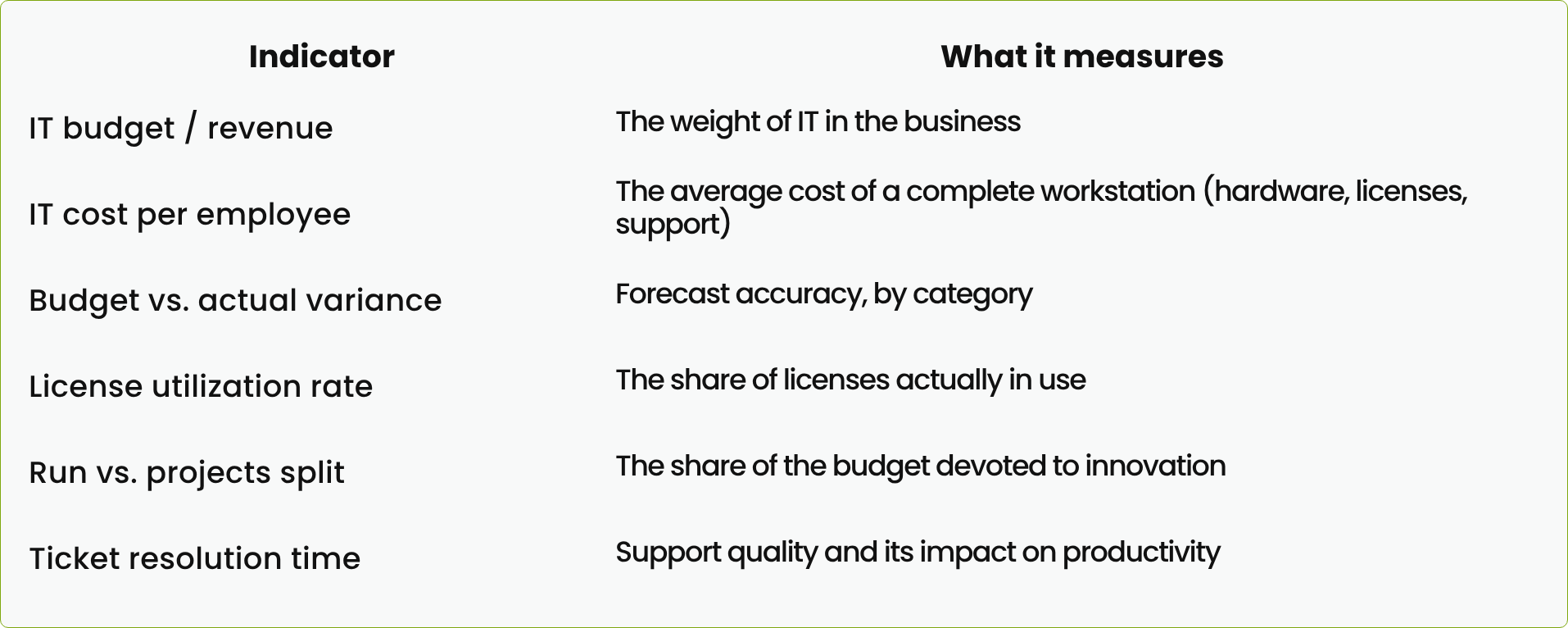
Financial management and reporting tools
Spreadsheets remain the most common tool, but they quickly show their limitations as your fleet grows: scattered data, manual updates, and errors. Dedicated management tools centralize hardware inventory, licenses, contracts, and expenses in a single interface.
The ideal approach is to have a real-time view, shared between the IT department and the finance team, with alerts for upcoming renewals and budget overruns.
How can you adjust your budget during the year?
Schedule a quarterly budget review. Compare actuals to forecasts, identify discrepancies and their causes, and then adjust: postpone a project, reallocate unspent funds, or tap into your contingency reserve.
Changes in headcount, a new strategic project, or a supplier price hike are all signals that justify a revision. An IT budget should be a living document, not a constraint set in stone in January.
rzilient clients have reduced their IT budgets by 30%
At rzilient, we support over 150 companies in managing their IT infrastructure. Several of them have reduced their IT budgets by 30%. Eskimoz is one of them.
A digital marketing agency specializing in SEO, SEA, and content, Eskimoz has 250 employees across 6 countries: France, England, Spain, Germany, Italy, and Morocco. Without an internal IT department, the People team, led by Head of People Rhita Belgnaoui, was also responsible for IT.
The challenge : keeping up with a rapid pace of recruitment across multiple sites without adding to the People team's daily workload, while securing the IT fleet and controlling software expenses.
What was implemented:
- A dedicated contact at rzilient, in near-daily communication with the People team, and tickets resolved quickly.
- Computers delivered ready-to-use, configured, and secured, with no manual setup required for each onboarding.
- Taking over the entire fleet and enrolling new devices in Intune, Microsoft's MDM.
- An audit of actual Microsoft 365 license usage, followed by recommendations to align subscriptions with needs.
The result : a 30% reduction in IT budget, Microsoft licenses aligned with actual needs, and a more secure fleet. For Rhita Belgnaoui, license optimization led to "significant savings in both time and money."
Read the full Eskimoz testimonial

Frequently asked questions about IT budgets
What percentage of revenue should be allocated to the IT budget?
There is no universal rule. Common benchmarks for most SMEs range between 2% and 5% of revenue, and significantly higher for digital, tech, or finance companies. Rather than focusing on this ratio, look at the IT cost per employee and its alignment with your growth objectives.
How can I justify an IT budget increase to management?
Speak in business terms, not technical ones. Link every increase to a measurable gain: time saved by teams, reduced cyber risk, enabled revenue, or costs avoided in the medium term. Also, quantify the cost of inaction, such as the impact of a cyberattack or obsolete hardware on productivity. Finally, demonstrate that you have already optimized existing resources: a request for an increase is better received when accompanied by identified savings elsewhere.
Should IT budget management be outsourced?
For many SMEs, yes, at least in part. Without a dedicated IT team, managing hardware, licenses, security, and support quickly becomes time-consuming. An IT managed services partner provides a centralized view of expenses, negotiated vendor terms, and a predictable monthly cost. The budgetary decision remains yours: outsourcing simply provides the data and levers to make it.