What operating system should you choose for a business?
Discover our all-in-one solution

Windows, Linux, MacOS... Choosing an operating system for a company is a structuring decision. It conditions the compatibility of your business software, the security of your computer equipment, the ease of use for your teams, and ultimately, your ability to work effectively on a daily basis.
However, this decision is often taken by default, you keep what you know, you follow the previous provider, or you simply choose the cheapest equipment. It's not necessarily a bad strategy, but it's rarely the best one.
In this guide, we help you see clearly: what are the main operating systems available for businesses, what criteria weigh in the balance, and how to deploy a system change calmly, without interrupting your business.
The main operating systems for businesses
Three players dominate the enterprise operating systems market. Each responds to different logics, with very distinct advantages and constraints.
Windows
Windows remains, by far, the most common operating system in businesses. Developed by Microsoft, it powers the vast majority of business laptops and workstations around the world. Its handling is intuitive for most users, who have often discovered it during their training or in their personal life.
For businesses, the dedicated versions, Windows 10 Enterprise and Windows 11 Enterprise, offer advanced features for centralized management (via Microsoft Intune), security (BitLocker, Windows Defender), and integration with Microsoft 365 productivity tools. The Windows application ecosystem is the richest on the market: almost all professional software, from ERP to accounting tools, to sectoral business solutions, is compatible with Windows.
It is also the system that integrates most naturally into a classic IT infrastructure of SMEs or ETIs, with well-established asset management, remote deployment and monitoring tools. That's why Windows remains our default starting point for the vast majority of our customers at rzilient.
linux
Linux is an open source operating system with a well-established reputation for security and stability. Very present on the server side, where it largely dominates the global market, it is gradually gaining ground on workstations, especially in tech companies, sensitive sectors or environments with a strong open source culture.
Its main advantages: recognized robustness in the face of cyberattacks, great flexibility thanks to the variety of Linux distributions available (Ubuntu, Debian, Red Hat, Fedora...), and license costs that are often lower than Windows. On the server side, Linux is the reference for hosting critical applications, databases or cloud infrastructures.
On the other hand, Linux requires more technical expertise for its deployment and administration. Compatibility with certain proprietary business software may be limited, and computer asset management under Linux requires specific tools. This is a serious option for companies that have a competent IT team or that use a specialized provider, but it requires a rigorous prior assessment of application compatibility.
MacOS
MacOS, Apple's operating system, has largely established itself in certain sectors: creative agencies, design firms, tech startups, consulting firms... Its user interface is renowned for its ergonomics and stability, and the Apple ecosystem (iPhone, iPad, iCloud) facilitates integration for companies already equipped with Apple hardware.
In terms of security, macOS has a robust architecture and an attack surface that is historically smaller than Windows, although this advantage is tending to be reduced with the increasing popularity of Macs in business.
The main point of vigilance: macOS is exclusively compatible with Apple hardware, which involves a significant initial investment, as Mac computers are significantly more expensive than equivalent PCs running Windows or Linux. Compatibility with certain specific business software can also be a problem, even if the offer has expanded considerably in recent years, in particular thanks to the web versions of the main tools.

Criteria for selecting an operating system for your business
Choosing an operating system means choosing between several variables that depend on your context: company size, budget, IT maturity, applications used, security requirements. Here are the three criteria that generally structure the decision.
Compatibility with business applications
This is often the most structuring criterion. Before choosing an operating system, you must draw up a list of the software on which your activity depends: ERP, CRM, accounting tools, sectoral software, internal applications... and check their compatibility with each OS considered.
Windows covers almost all software available on the market, including proprietary solutions. Linux offers good coverage for open source tools and web applications, but may run up against software specific to the Windows environment. macOS does well on most common tools (Microsoft 365 suite, creative tools, SaaS), but some business solutions remain exclusively available on Windows.
Our recommendation: list your critical applications, identify those that are only compatible with a single OS, and let this constraint guide your choice. There is no point in choosing a technically superior operating system if your business tools do not run on it.
Total cost of ownership
The price of a license is just the tip of the iceberg. The total cost of owning an operating system includes software licenses, but also user training, maintenance costs, fleet management tools, possible specific developments and support.
Here is a comparative view of the three systems on the main cost items:
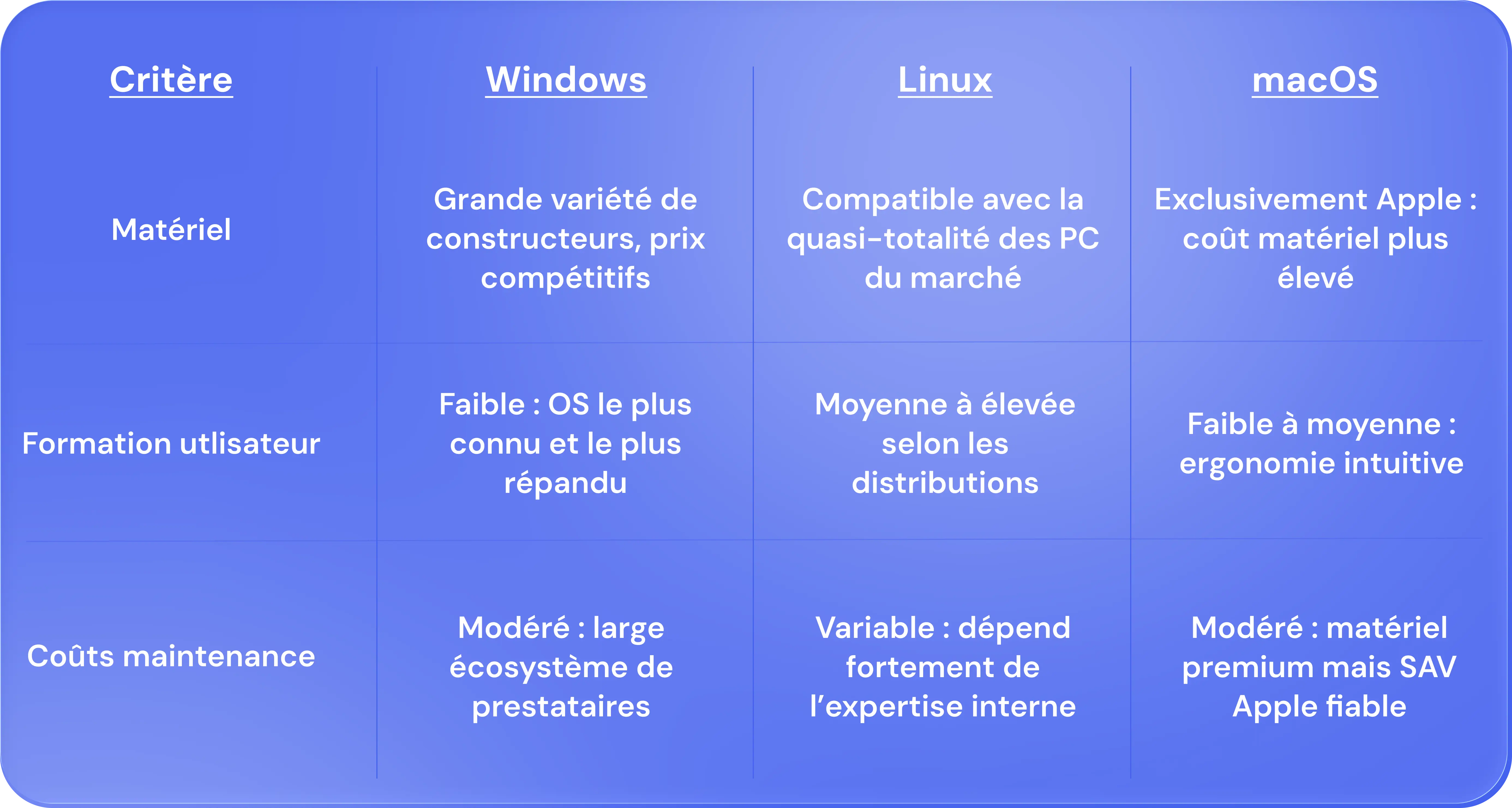
The real cost of an operating system is therefore never limited to the price of the license. A free Linux distribution can be more expensive than a well-managed Windows environment, if it requires specific skills that are difficult to find internally. It is in this logic that our approach at Rzilient is part of: to support you in the choice, deployment and long-term management of your fleet, so that the total cost remains under control.
Security and updates
Corporate cybersecurity has become a non-negotiable issue. The choice of operating system has a direct impact on the level of exposure of your organization to cyber threats.
Windows, due to its dominant market share, is the most frequent target of attacks. But recent versions (Windows 10 and 11 Enterprise) incorporate advanced protection mechanisms: BitLocker encryption, Windows Defender, vulnerability management via Microsoft Defender for Endpoint. The key remains the regularity of updates: a poorly patched Windows system is a vulnerable one.
Linux has a naturally smaller attack surface, and its open source culture allows for rapid detection and correction of flaws. However, it remains exposed on servers, where it is very present and therefore very targeted.
macOS benefits from a secure Unix architecture and regular updates from Apple. However, its growing popularity in business has exposed it to increased attention from cybercriminals in recent years.
Regardless of the system chosen, security depends above all on the rigor with which updates are applied, accesses managed and equipment monitored. To go further on this subject, our article on cybersecurity in business will give you the keys to building a solid posture, regardless of the OS selected.
Steps to deploy a new operating system in business
Changing or deploying an operating system across an entire computer park is a project in its own right. Well done, it takes place without interruption of activity. Poorly prepared, it can mobilize weeks of support and generate lasting frustration among teams.
Needs assessment and planning
Before touching any position, a complete inventory must be established. This evaluation phase must answer several concrete questions:
- What software is used on a daily basis, and which is compatible with the new operating system under consideration?
- What is the technical maturity level of your users? Will they need training or change support?
- What equipment is concerned, and is it compatible with the new OS (hardware configuration, drivers, graphics card...)?
- What are the regulatory or sectoral constraints to be taken into account (certifications, RGPD compliance, security audits)?
Based on this analysis, you can build a realistic deployment plan: scope concerned, schedule, resources mobilized, training plan and business continuity plan in the event of an incident.
It is at this stage that the contribution of an IT partner like Rzilient makes perfect sense. Our platform centralizes the complete inventory of your fleet, the status of the equipment, the versions of the operating systems in place and the applications deployed. Everything you need to make an informed decision and plan without blind spots.
Test and pilot deployment
Before large-scale deployment, it is essential to carry out a pilot on a restricted area: a department, a team, a few positions representative of the uses of the company. This test phase makes it possible to identify application incompatibilities, driver or hardware configuration problems, and unanticipated training needs.
Pilot deployment must involve users who represent the diversity of real uses: not only IT profiles, but also business teams who use the most critical software on a daily basis.
Once the pilot is validated, deployment in production can be carried out in waves, with reinforced IT support during the first weeks. At rzilient, our automations make it possible to prepare, configure and deploy workstations remotely so that each employee receives a computer already set up, with the software installed and the accesses configured, from day one. That's what we call frictionless IT onboarding.
A well-planned operating system change should not be experienced as a constraint by your teams but as a visible improvement in their daily experience. This is the objective that we share with each of our customers.
.webp)