
Apple MDM: how to effectively manage an Apple fleet in the workplace
Discover our all-in-one solution

In brief: An Apple MDM is a solution that lets you remotely configure, secure, and manage all of a company's iPhones, iPads, and Macs. Paired with Apple Business Manager, it makes deployment automatic: the device sets itself up the very first time it's turned on. The most widely used solutions are Jamf Pro, dedicated to Apple, and Microsoft Intune, which is cross-platform. At rzilient, we are MDM-agnostic: we adapt to your tools and equipment, and we can run multiple MDMs side by side across a single fleet.
Macs and iPhones have become standard in businesses, from startups to large corporations. But managing an Apple fleet is not something you can improvise: without the right tool, every new device must be configured manually, updates depend on individual cooperation, and a lost computer becomes a potential data breach.
That's the whole point of an MDM built specifically for the Apple ecosystem. In this guide, discover how it works, which features to prioritize, how to choose the right solution, and the best practices to follow to manage your fleet efficiently.
What is an Apple MDM and why is it essential for your business?
Definition and role of Mobile Device Management for Apple devices
An Apple MDM (Mobile Device Management) is software that allows IT administrators to remotely manage a company's Apple devices: Macs, iPhones, iPads, and even Apple TVs or Apple Vision Pros. It relies on the management framework built into macOS, iOS, and iPadOS, providing fine-grained, native control over the devices.
In practical terms, MDM is used to install applications, apply settings and security policies, deploy updates, track inventory, and, if necessary, remotely lock or wipe a device. All of this is done from a single console, without ever needing to physically touch the equipment.
The challenges of managing a fleet of iOS and macOS devices
Managing an Apple fleet presents specific challenges:
- Device diversity: Macs for teams, professional iPhones, iPads for sales staff or retail, each with its own settings.
- Hybrid work: devices are rarely in the office, so they must be configurable and updatable remotely.
- Update cadence: Apple regularly releases security patches that must be applied quickly across the entire fleet.
- Mixed environments: many companies manage both Macs and Windows PCs, often using different tools.
- Onboarding and offboarding: every new hire must receive a ready-to-use device, and every departure must involve the recovery and secure wiping of the hardware.
Security, compliance, and productivity: key benefits
An Apple MDM provides three major benefits:
- Security: FileVault encryption enforced on Macs, mandatory passcode locks, applied updates, and remote locking or wiping in case of loss or theft.
- Compliance: real-time visibility into the status of the fleet, proof of adherence to security policies for GDPR, client audits, or certifications like ISO 27001 or SOC 2.
- Productivity: devices configured automatically, applications installed from the first startup, and an IT team freed from manual tasks.
How does an Apple MDM work with Apple Business Manager?
Integration with Apple Business Manager: the foundation of management
Apple Business Manager (ABM) is a free web portal offered by Apple to businesses. Its equivalent for educational institutions is called Apple School Manager. ABM is the starting point for any professional management of an Apple fleet. It notably allows for:
- automated device enrollment: iPhones, iPads, and Macs purchased from Apple or an authorized reseller are automatically linked to your organization, and then to your MDM;
- volume purchasing of apps (Apps and Books), which are then distributed by the MDM without needing personal Apple IDs;
- creation of Managed Apple Accounts, which can be federated with your cloud identity providers like Microsoft Entra ID or Google Workspace.
Once ABM is linked to your MDM solution, a new device configures itself: upon first startup, it contacts Apple, recognizes that it belongs to your company, and downloads its configuration. This is known as "zero-touch" deployment.
Configuration and deployment of configuration profiles
Settings are transmitted to devices in the form of configuration profiles. Each profile groups together a set of parameters: Wi-Fi networks, VPNs, email accounts, restrictions, password requirements, certificates, and encryption. The MDM sends them automatically according to rules defined by the administrator, for example by department, device type, or country.
Apple is also evolving its management framework toward declarative device management: the device itself applies the expected state and reports its status back to the MDM, making management faster and more reliable.
Remote management for iPhone, iPad, and Mac
From the MDM console, administrators can manage any device, wherever it is located:
- install, update, or remove applications;
- force the installation of a macOS or iOS update;
- lock the device, enable Lost Mode, or remotely wipe it;
- view detailed inventory: model, system version, disk space, encryption status;
- reassign a device to a new employee after a reset.
On iPhone and iPad, these capabilities are even more extensive when the device is "supervised," a mode activated automatically during deployment via Apple Business Manager.
Essential features of an MDM solution for Apple devices
Automated deployment and configuration of IT equipment
Automated deployment is the feature that saves the most time. When paired with Apple Business Manager, an MDM allows you to ship a Mac or iPhone directly to an employee without involving the IT team: upon startup, the device enrolls itself and receives its settings, applications, and access permissions. A good MDM also allows you to customize the setup assistant and provide different configurations based on user profiles (developers, sales, management).
Security policy management and compliance
The MDM applies and monitors security policies across the entire fleet:
- disk encryption (FileVault) and centralized key recovery;
- mandatory passcode or password, with complexity requirements;
- activation of the firewall and macOS system protections;
- usage restrictions: application installation, file sharing, USB peripherals;
- detection of non-compliant devices, with alerts or blocking of access to company resources.
To go further, complementary solutions like Jamf Protect add Mac-specific threat protection, and Jamf Connect simplifies login using corporate credentials.
Remote updates and maintenance for your fleet
macOS and iOS updates regularly patch security vulnerabilities. An MDM allows you to schedule them, set installation deadlines, defer major versions while verifying business software compatibility, and track the percentage of updated devices. It also allows you to diagnose issues and push fixes or scripts without physical intervention.
Supervision of personal and professional devices (BYOD)
Not all devices are managed the same way. A company-issued device can be fully supervised. A personal device used for work (BYOD) falls under user enrollment: the MDM then only manages a separate professional space containing company applications and data, without access to the employee's personal photos, messages, or data. If the employee leaves, only this professional space is removed.
How to choose the best Apple MDM solution for your organization?
Key criteria for selecting your MDM
Before choosing, evaluate each solution based on these criteria:
- The composition of your fleet: 100% Apple, or mixed with Windows PCs and Android smartphones.
- The depth of Apple management: support for new macOS and iOS versions upon release, declarative management, and Mac-specific features.
- Integration with your tools: Apple Business Manager, identity providers (Microsoft Entra ID, Google Workspace), HRIS, and security tools.
- The ease of use of the console for your administrators.
- Security: threat protection, compliance, and audit reports.
- Total cost: licenses, implementation, and administration time.
Comparing the leading solutions: Jamf Pro, Intune, and alternatives
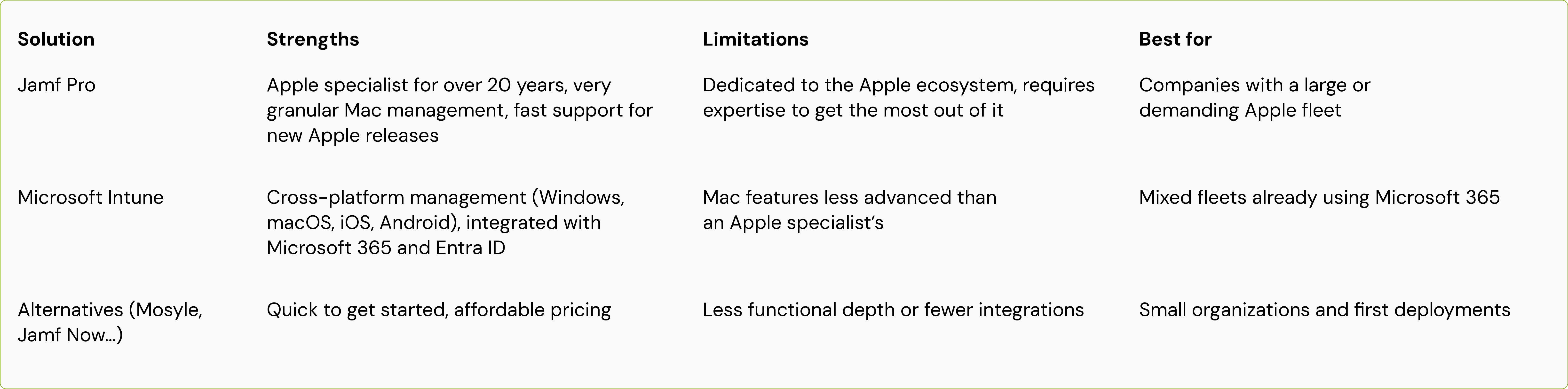
There is no single "best" solution: the right MDM is the one that fits your fleet, your tools, and your security requirements. And there is no rule saying you have to choose just one.
That's the approach we champion at rzilient: we are MDM-agnostic. Rather than imposing a single tool, we adapt to each company, its policies, and its hardware choices. You can even run multiple MDMs within the same fleet—for instance, Jamf for the Apple ecosystem and Intune for the Microsoft environment—all managed centrally from the rzilient platform. That's exactly what we implemented at Yousign, where Jamf manages the Macs and Intune manages the Windows PCs (read the Yousign case study).
For Apple fleets, we notably offer Jamf Pro, Jamf Connect, and Jamf Protect, fully integrated into your rzilient interface: discover our rzilient x Jamf partnership.
The importance of support and personalized guidance
An MDM is a powerful tool, but it doesn't configure itself. The initial setup (connecting to Apple Business Manager, profiles, security policies, app catalog) determines the project's success. Expert guidance helps avoid configuration errors, saves weeks of deployment time, and ensures you have responsive support when an employee runs into an issue.
Budget and ROI of an Apple MDM
Most MDMs are billed as a subscription, per device or per user per month. At rzilient, Jamf plans start at €10 per user.
Return on investment is primarily measured in time saved: every automatically configured device eliminates manual setup, every remotely pushed update avoids a manual intervention, and every prevented security incident (such as a stolen unencrypted device or an unpatched vulnerability) represents a potential cost far greater than the license fee.
Best practices for effectively deploying and managing your Apple fleet
Preparing for integration with Apple Business Manager
Registering for Apple Business Manager requires a few prerequisites: a D-U-N-S number for your company, a verified domain, and an administrator account. Plan ahead for these steps, as they can take several days. Then, provide your organization ID to your resellers so that every new device purchased is automatically linked to your account. For devices already in circulation, you can add them manually to ABM using Apple Configurator.
Training your administrators and users
Your administrators must master the MDM console, configuration profiles, and key procedures: preparing a new device, reassigning devices, and remote wiping. For users, simply explain what the company can and cannot see on their device, especially in a BYOD context: transparency fosters adoption and reduces resistance.
Optimizing security without compromising the user experience
Most employees choose Apple for its simplicity: an overly restrictive MDM can quickly become a source of frustration. Focus on a few essential, non-negotiable measures (encryption, updates, passcodes, multi-factor authentication) and allow flexibility for the rest. A self-service app catalog, like Jamf's Self Service, allows employees to install approved tools themselves without needing to open a support ticket.
Measuring and improving your mobile device management
Track a few simple metrics to manage your fleet:
- the percentage of devices that are up-to-date and encrypted;
- the average time to provision a device for a new hire;
- the number of non-compliant devices and the time taken to bring them back into compliance;
- the volume of support tickets related to Apple devices.
Review your profiles and policies at least once a year, and with every major release of macOS or iOS.
Frequently asked questions about Apple MDM
What is the difference between MDM and EMM for managing Apple devices?
MDM (Mobile Device Management) manages the device itself: configuration, security, updates, and inventory. EMM (Enterprise Mobility Management) goes further by adding application, content, and identity management. In practice, the line has blurred: modern Apple MDM solutions like Jamf Pro or Intune now include most EMM features.
Can you manage Apple devices without Apple Business Manager?
Yes, but with limitations. Without Apple Business Manager, MDM enrollment must be done manually, device by device, and the user can remove the management profile. iPhones and iPads also cannot be supervised as easily, which limits control. For business fleets, ABM is highly recommended: it is free and enables automatic deployment.
How can you secure personal devices used in the workplace?
Use the User Enrollment option offered by Apple for BYOD. It creates a separate work space on the personal device, managed by the MDM, without accessing the employee's private data. Supplement this with conditional access rules: only enrolled and compliant devices can access company email and apps. Finally, formalize usage rules in a policy that every employee agrees to.
How much does an Apple MDM solution cost on average?
Apple MDM solutions are generally billed as a subscription, ranging from a few euros per device per month for entry-level plans to more for comprehensive solutions that include threat protection and identity management. Intune is included in some Microsoft 365 licenses. At rzilient, the Jamf offer starts at €10 per user. Remember to factor in the time required for setup and administration, or the cost of expert support.